

Tracking usage and quotas
Overview
The Billing & cost page is where you see what your organization is consuming, what it has cost so far this cycle, and how much of each resource quota is still available. Usage is metered continuously by hourly collectors: prepaid organizations see each metered slice debited from the organization wallet, while postpaid organizations see the same usage accumulate as unbilled amounts until the month-end invoice is generated.
Two tabs do most of the work:
- Usage Details — a per-resource breakdown of hours and cost for the selected period, with each resource named, linked to its own page, and stamped with its full resource id.
- Resource Quotas — the limits that apply to your organization and how much of each you have used.
Before you start
- You need the
billing:readpermission to open Billing and to read usage, quota and spend data. Exporting or paying is separate:billing:managegoverns mutating billing actions. - You must be a member of the organization whose usage you are viewing, and have access to the project if you filter usage down to one.
- Usage rows only appear for resources that have been metered at least once, so a resource created moments ago may not yet have a row.
- Managed database quotas apply only where the Databases feature is available to you; Databases is in beta.
Steps
In the sidebar, open Billing under the ACCOUNT group.
Start on the Overview tab for the current cycle's totals — wallet position, spend to date and unbilled usage.
Switch to the Usage Details tab to break the total down by resource. Each row shows the resource name (linked to that resource's page), its full id, the metered hours and the cost attributed to the selected period.
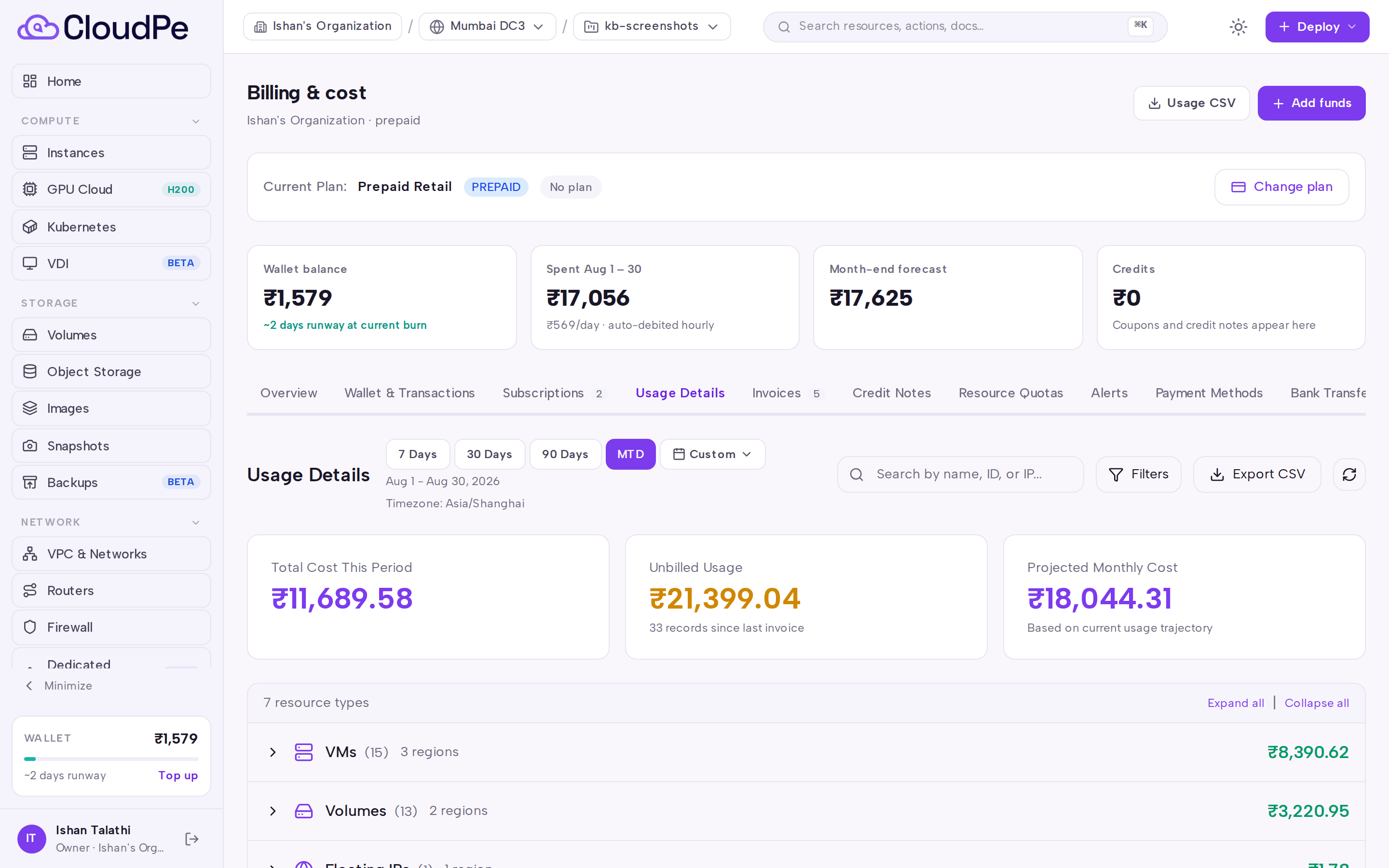
Use the filters on the tab to narrow by resource type or search by name, and adjust the period to the window you want to reconcile.
Select Usage CSV to download the usage rows as a file. The CSV carries the full resource UUID per row, so it can be used directly as a reconciliation input rather than matching on names.
Switch to the Resource Quotas tab to see the limits in force for your organization and current consumption against each one.
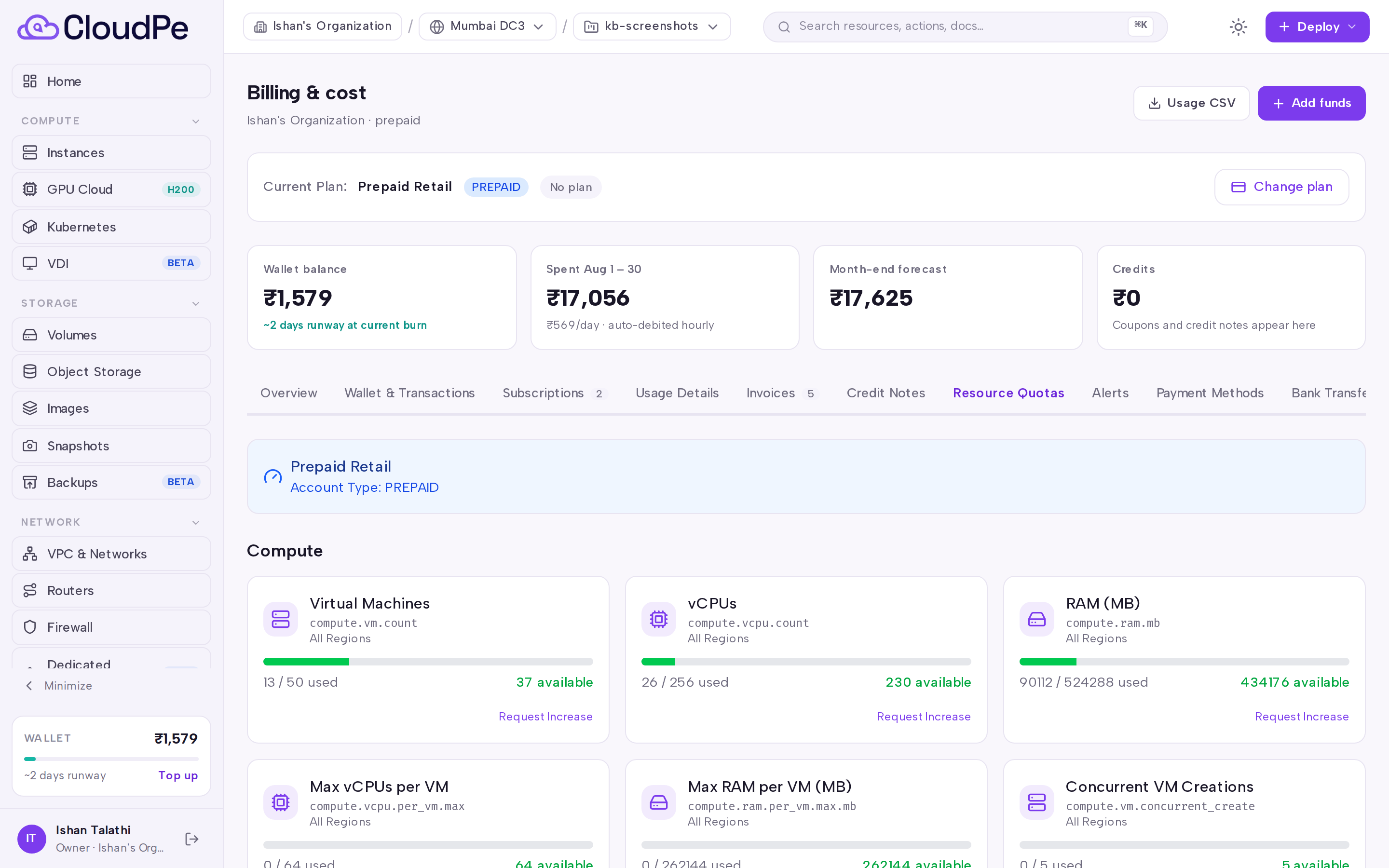
If a quota is close to being exhausted, or a cost is higher than expected, use the Alerts tab to review your notification settings and the Wallet & Transactions tab to check the ledger entries behind each debit.
API
The following read endpoints back the same data as the page.
| Method | Path |
|---|---|
| GET | /api/v1/billing/overview |
| GET | /api/v1/billing/usage |
| GET | /api/v1/billing/usage/images |
| GET | /api/v1/billing/spend/daily |
| GET | /api/v1/billing/quotas |
| GET | /api/v1/billing/quotas/summary |
| GET | /api/v1/billing/invoices/summary/unbilled |
| GET | /api/v1/billing/invoices/{invoice_id}/usage.csv |
| GET | /api/v1/postpaid-billing/unbilled-usage |
Current usage:
curl https://app.cloudpe.com/api/v1/billing/usage \
  -H "Authorization: Bearer <API_KEY>"
Quota summary:
curl https://app.cloudpe.com/api/v1/billing/quotas/summary \
  -H "Authorization: Bearer <API_KEY>"
Usage statement CSV for a specific invoice:
curl https://app.cloudpe.com/api/v1/billing/invoices/<invoice_id>/usage.csv \
  -H "Authorization: Bearer <API_KEY>"
Limits & billing
- Usage is collected hourly per resource family (compute, storage, network, images, object storage, Kubernetes, VDI, PaaS and managed databases). Figures on Usage Details therefore lag live activity by up to one collector interval.
- Prepaid organizations are debited from the organization wallet as usage is metered; the wallet ledger on Wallet & Transactions carries one row per debit with the resource identity attached.
- Postpaid organizations accumulate usage and receive a single usage invoice per month, generated at month end. Until then the amounts show as unbilled usage.
- Object storage usage is metered per period rather than as a running lifetime total, so its rows are already scoped to the window you select.
- Default managed database quotas cover the number of clusters (5), nodes per cluster (5), storage in GiB (500) and backups per cluster (10).
Troubleshooting
| Message | What it means | What to do |
|---|---|---|
Permission denied: billing:read required |
Your role does not include read access to usage and billing data. | Ask an organization owner to grant a role carrying billing:read. |
Permission denied: billing:manage required |
The action you attempted changes billing state, not just reads it. | Ask an organization owner, or a member with billing:manage, to perform it. |
You are not a member of this organization |
You are querying usage for an organization you do not belong to. | Switch to an organization you are a member of and retry. |
Access denied to this project |
The project filter points at a project outside your access. | Remove the project filter or request access to that project. |
Organization not found |
The organization id in the request does not resolve. | Re-open Billing from the sidebar so the active organization is used. |
Invalid organization ID format |
The organization id supplied to the API is not a valid UUID. | Pass the organization's UUID exactly as returned by the API. |
end_date must be on or after start_date |
The custom reporting window is inverted. | Set the end of the window on or after its start. |
start_date and end_date required for custom period |
A custom period was selected without both bounds. | Supply both bounds, or pick a predefined period instead. |
FAQ
Why does a resource show hours but almost no cost? A resource covered by a non-hourly subscription or a committed plan is metered for visibility but not charged again per hour — the subscription invoice already covers it.
Why is a deleted resource still listed? Usage rows keep the resource's name and id as they were when metered, so a period that includes the resource's lifetime still shows it. The link may fall back to the resource list page once the resource is gone.
Why do some rows show a name as plain text instead of a link? Not every metered category maps to a dashboard page; those rows render the name without a link rather than pointing somewhere wrong.
Does the cost on Usage Details include tax? No. It is the metered charge; GST and any TDS treatment are applied on the invoice.
How do I get the same data outside the console? Use Usage CSV on the Usage Details tab, or the read endpoints listed above.