

Deploying apps on the Apps platform
Overview
The Apps platform (Apps, under PLATFORM in the dashboard) builds a web application straight from a Git repository and runs it on CloudPE-managed Kubernetes. When you create an app, the platform clones the repository at the branch you name, builds a container image with Kaniko, pushes it to a private registry, and rolls out a Kubernetes Deployment, Service and Ingress with a TLS certificate issued automatically. The result is reachable at an HTTPS hostname derived from the app slug on the platform apps domain (<slug>.apps.<region-domain>).
Three runtimes are supported: nodejs, static (served through nginx) and docker (your own Dockerfile). Runtime selection is manual — there is no automatic framework detection.
Apps is a beta feature. Behaviour and limits may change between releases.
Before you start
- Identity verification: your organization must have completed KYC before any cloud resource, including an app, can be created.
- Organization and project: you need to belong to an organization and have a provisioned project. The project must live in the region you are deploying into — resources cannot be created from a project belonging to a different region.
- Permissions: reading apps, builds, deployments and logs requires
paas:read. Creating an app requirespaas:create. Redeploy, rollback, suspend/resume, environment variables, domains and database links requirepaas:update. Deleting an app requirespaas:delete. - Wallet balance: running apps are billed hourly against the organization wallet, so keep the wallet funded.
- Git access: have the repository URL and branch ready, or install the CloudPE GitHub App if you want to deploy from a connected GitHub repository.
Steps
Open Apps from the PLATFORM group in the sidebar. The list shows every app in the current project with its status; use Refresh to force an update.

Click Create App.
Choose the source. Select GitHub App to pick a repository from a connected GitHub account — if no account is connected yet, use Install GitHub App first. Select Git URL to point at a repository by URL instead.
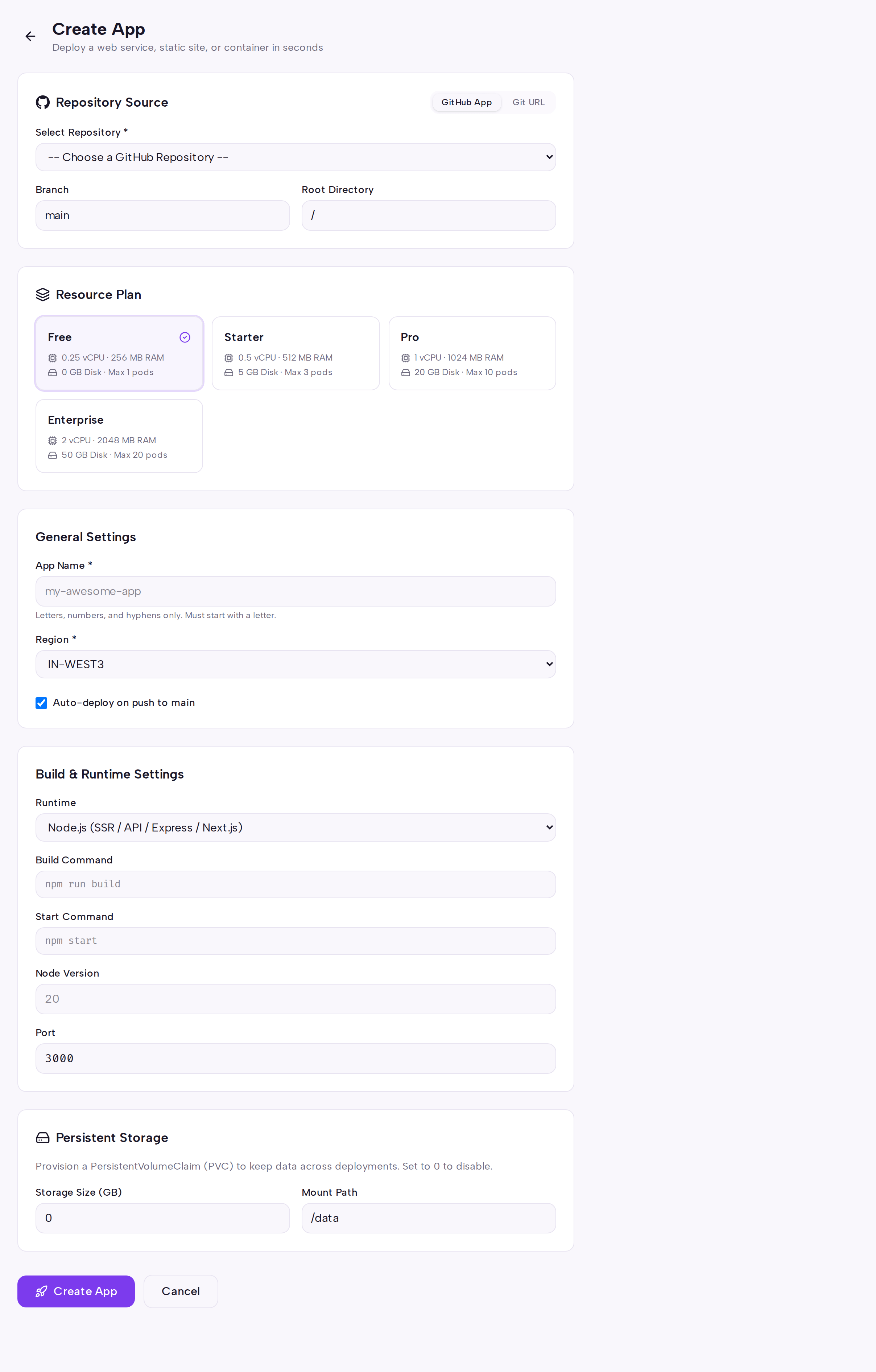
Fill in the app details: name, branch, and the runtime (
nodejs,staticordocker). Then set the build configuration — root directory, build command, start command, Node.js version where applicable, and the port your process listens on.Click Create App to submit, or Cancel to discard the form. Creating the app immediately queues the first build.
You land on the app detail page. Follow progress through the tabs: Overview for status and the current build, Builds for build history and logs, Deployments for rollout history, Logs for runtime output, Environment for environment variables, Domains for custom hostnames, Databases for managed database links, and Settings for app configuration.

To ship a new commit, use Redeploy on the app detail page. Use Delete to remove the app and clean up its Kubernetes resources.
API
The following operations are available on the public API.
| Method | Path |
|---|---|
| POST | /api/v1/paas/apps |
| GET | /api/v1/paas/apps |
| GET | /api/v1/paas/apps/{app_id} |
| PATCH | /api/v1/paas/apps/{app_id} |
| DELETE | /api/v1/paas/apps/{app_id} |
| POST | /api/v1/paas/apps/{app_id}/deploy |
| POST | /api/v1/paas/apps/{app_id}/rollback |
| POST | /api/v1/paas/apps/{app_id}/suspend |
| POST | /api/v1/paas/apps/{app_id}/resume |
| GET | /api/v1/paas/apps/{app_id}/builds |
| GET | /api/v1/paas/apps/{app_id}/builds/{build_id}/logs |
| GET | /api/v1/paas/apps/{app_id}/deployments |
| GET | /api/v1/paas/apps/{app_id}/logs |
| GET | /api/v1/paas/apps/{app_id}/env |
| PUT | /api/v1/paas/apps/{app_id}/env |
| DELETE | /api/v1/paas/apps/{app_id}/env/{key} |
| GET | /api/v1/paas/apps/{app_id}/domains |
| POST | /api/v1/paas/apps/{app_id}/domains |
| DELETE | /api/v1/paas/apps/{app_id}/domains/{domain_id} |
| GET | /api/v1/paas/apps/{app_id}/databases |
| POST | /api/v1/paas/apps/{app_id}/databases |
| DELETE | /api/v1/paas/apps/{app_id}/databases/{link_id} |
Create an app (this also queues the first build):
curl -X POST https://app.cloudpe.com/api/v1/paas/apps \
  -H "Authorization: Bearer <API_KEY>" \
  -H "Content-Type: application/json" \
  -d '{
    "name": "my-app",
    "repo_url": "<GIT_REPO_URL>",
    "branch": "main",
    "runtime": "nodejs",
    "root_directory": "/",
    "build_command": "npm run build",
    "start_command": "npm start",
    "port": 3000
  }'
Trigger a redeploy:
curl -X POST https://app.cloudpe.com/api/v1/paas/apps/<app_id>/deploy \
  -H "Authorization: Bearer <API_KEY>"
Fetch the logs of a specific build:
curl https://app.cloudpe.com/api/v1/paas/apps/<app_id>/builds/<build_id>/logs \
  -H "Authorization: Bearer <API_KEY>"
Roll back to the previous successful build:
curl -X POST https://app.cloudpe.com/api/v1/paas/apps/<app_id>/rollback \
  -H "Authorization: Bearer <API_KEY>"
Limits & billing
- Running apps are charged hourly against the organization wallet, based on the app's plan tariff and its replica count.
- Suspending an app scales its pods to zero and stops billing; resuming restores the pods and resumes billing. Deleting an app also closes its usage record.
- Replica count is fixed per app — there is no auto-scaling on the Apps platform.
- Build layers are not cached between builds, so each build starts from scratch.
- Plans are assigned automatically; there is no plan picker in the customer UI.
- Custom domains configured on the Domains tab are not preserved across a redeployment and must be re-added.
Troubleshooting
| Message | What it means | What to do |
|---|---|---|
Complete identity verification to create cloud resources. |
The organization has not finished KYC, so no app can be created. | Complete identity verification, then retry Create App. |
Project belongs to a different region; cannot create resources here. |
The selected project is scoped to another region than the one you are deploying into. | Switch to a project in the target region, or create one there first. |
Billing gate misconfigured for this resource. |
The billing eligibility check for the resource could not be evaluated. | Retry; if it persists, raise a support ticket with the app name and timestamp. |
You must belong to an organization to create API keys |
You tried to mint an API key for the Apps API without an organization. | Join or create an organization, then generate the key from API Keys. |
For build-time failures, open the Builds tab and read the log of the failed build; for crash loops or startup errors after a successful build, check the Logs tab.
FAQ
How do I ship a new commit?
Open the app and click Redeploy, or call POST /api/v1/paas/apps/{app_id}/deploy. The platform re-clones the branch, rebuilds the image and rolls out a new deployment.
Can I go back to the previous version? Yes. Use the rollback endpoint to return to the last successful build. Past builds and rollouts are listed on the Builds and Deployments tabs.
How do I stop paying for an app without deleting it? Suspend it. Pods are scaled to zero and billing stops until you resume the app.
Where do environment variables live? On the Environment tab of the app, or via the env endpoints. They are injected into the container on the next deployment.
Which runtimes can I use?
nodejs, static and docker. The runtime is chosen manually when you create the app; there is no automatic framework detection.