

Deploying an app from a GitHub repository
Overview
The CloudPe App Platform builds a web application straight from a Git repository and runs it on managed Kubernetes. When you create an app, CloudPe clones the repository at the branch you choose, builds a container image, pushes it to a private registry, and deploys it with a Service and TLS ingress — no cluster or manifests to manage yourself.
This article covers deploying from a GitHub repository connected through the CloudPe GitHub App, which also enables push-to-deploy. If you would rather point at a public repository without connecting GitHub, the create form also accepts a plain Git clone URL.
Apps is currently in beta.
Before you start
- Identity verification: your organization must have completed KYC before you can create cloud resources.
- Wallet: running apps are billed against the organization wallet, so keep it funded.
- Project and region: select a project in a PaaS‑enabled region before you start; you cannot create resources in a project that belongs to a different region.
- Permissions:
paas:readto view apps,paas:createto create one,paas:updateto redeploy or change settings,paas:deleteto remove an app. - Repository: a GitHub repository containing a web application that listens on the port supplied in the
PORTenvironment variable and binds to0.0.0.0.
Steps
1. Open the Apps list
In the dashboard sidebar, go to Apps under PLATFORM, then click Create App.

2. Choose the GitHub source
On Create App, pick GitHub App as the source. If CloudPe is not yet connected to your GitHub account or organization, click Install GitHub App — GitHub opens the installation page, where you grant access either to all repositories or to a selected set, and then returns you to CloudPe.
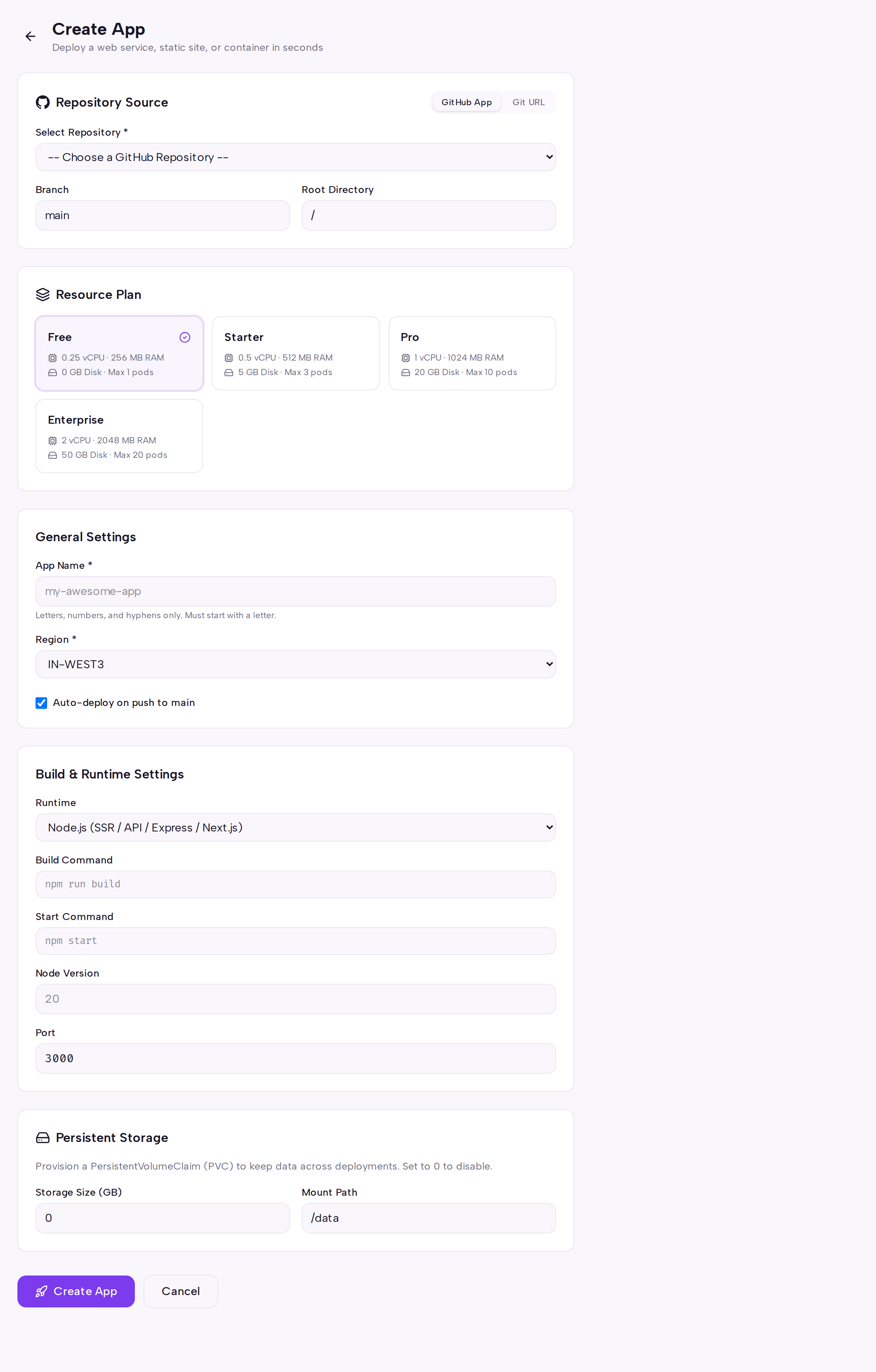
Once installed, your repositories appear in the browser and you can select the one to deploy. You can revoke or change the repository selection later from GitHub, under the CloudPe Deploy app configuration.
If you choose Git URL instead, paste the HTTPS clone URL of a public repository. Push‑to‑deploy is not available for URL‑based apps.
3. Configure the app
Fill in the rest of the form:
- App name — a human‑readable name; CloudPe derives a URL‑safe slug from it.
- Branch — the branch to build from.
- Runtime — Node.js, static site, or Docker (Docker builds the
Dockerfilein your repository as‑is). - Root directory — set this for monorepos so the build runs in the subdirectory that holds your manifest file.
- Build command, start command and port — override the defaults where your project needs it.
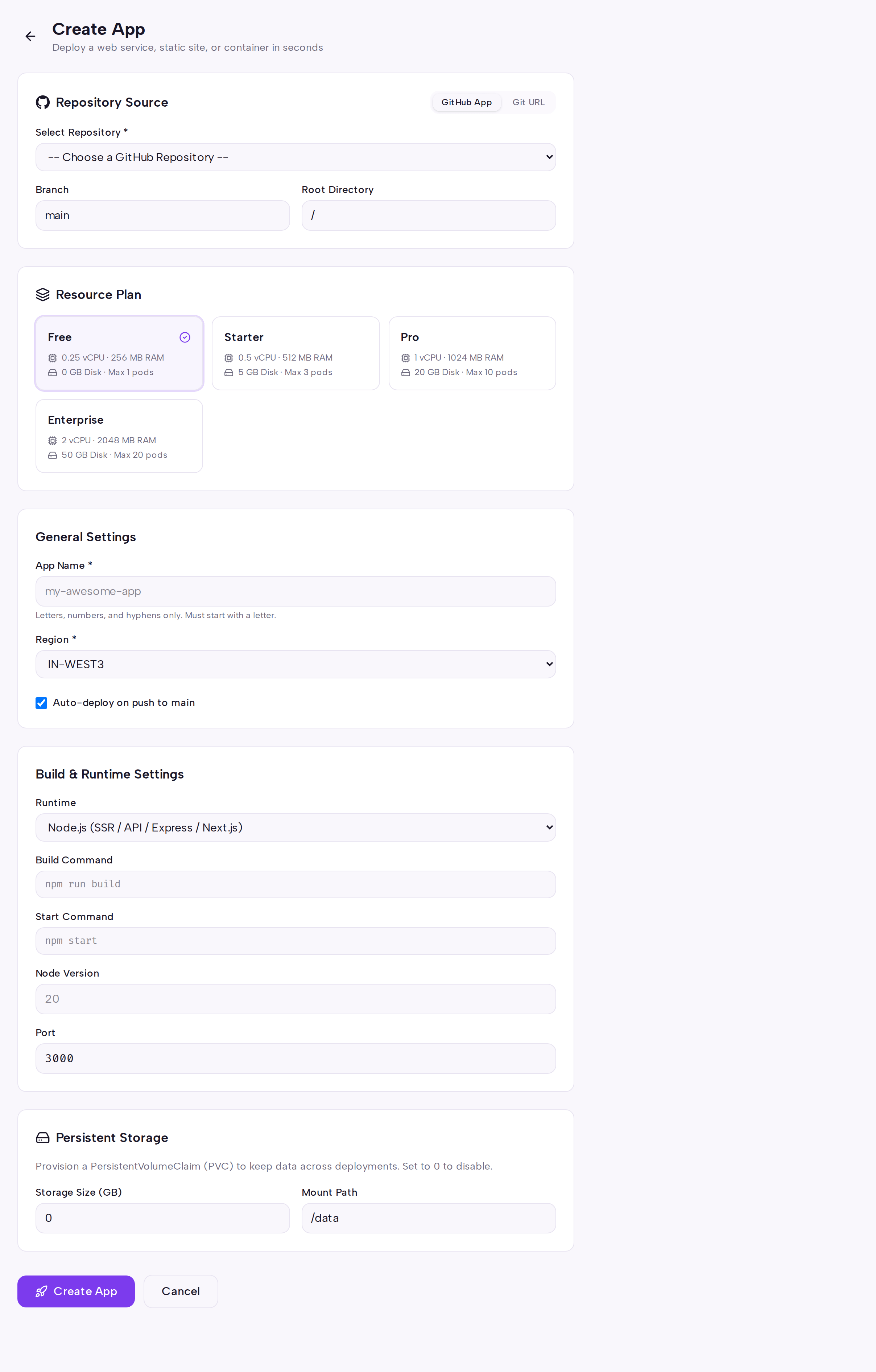
Click Create App. CloudPe saves the app and queues the first build immediately, then takes you to the app detail page.
4. Watch the build
Open the Builds tab to follow the build: the repository is cloned, a Dockerfile is generated (or yours is used), the image is built and pushed to the registry, and the Kubernetes Deployment, Service and Ingress are created or updated.

Select a build to stream its logs. Failed builds keep their logs so you can diagnose the failure before retrying.
5. Verify the running app
The Overview tab shows the current status as it moves from building, to deploying, to running, along with the app URL. Click the URL to open your app.

Use Redeploy to rebuild from the latest commit on the configured branch, or to re‑deploy an earlier successful build from the Builds tab (that path re‑uses the existing image, so no rebuild happens). The Deployments tab records every deployment, Logs streams runtime output, and Environment, Domains and Databases handle configuration, custom domains and managed‑database links.
API
Available operations for Git‑based app deployment:
| Method | Path |
|---|---|
| POST | /api/v1/paas/apps |
| GET | /api/v1/paas/apps |
| GET | /api/v1/paas/apps/{app_id} |
| GET | /api/v1/paas/apps/{app_id}/builds |
| GET | /api/v1/paas/apps/{app_id}/builds/{build_id}/logs |
| POST | /api/v1/paas/apps/{app_id}/deploy |
Create an app from a repository:
curl -X POST https://app.cloudpe.com/api/v1/paas/apps \
  -H "Authorization: Bearer <API_KEY>" \
  -H "Content-Type: application/json" \
  -d '{
    "name": "My Blog",
    "repo_url": "<https_clone_url>",
    "branch": "main",
    "runtime": "nodejs"
  }'
List the build history and read a build's logs:
curl https://app.cloudpe.com/api/v1/paas/apps/<app_id>/builds \
  -H "Authorization: Bearer <API_KEY>"

curl https://app.cloudpe.com/api/v1/paas/apps/<app_id>/builds/<build_id>/logs \
  -H "Authorization: Bearer <API_KEY>"
Trigger a redeploy:
curl -X POST https://app.cloudpe.com/api/v1/paas/apps/<app_id>/deploy \
  -H "Authorization: Bearer <API_KEY>"
Limits & billing
- Apps are charged hourly against the organization wallet for as long as they are running; the charge scales with the number of replicas on the app's plan.
- Suspending an app scales its pods to zero and stops the usage clock; resuming it restores the pods and billing.
- Replicas are fixed per app — there is no auto‑scaling on the App Platform, so scale by changing the replica count.
- Builds are not cached between runs, so each build installs dependencies from scratch.
- Runtime selection is manual on the create form when you deploy from a Git URL.
Troubleshooting
| Message | What it means | What to do |
|---|---|---|
Complete identity verification to create cloud resources. |
Your organization has not finished KYC, so no app can be created. | Complete identity verification, then retry Create App. |
Project belongs to a different region; cannot create resources here. |
The selected project is not in the region you are deploying into. | Switch to a project in a PaaS‑enabled region, or create one there, and retry. |
You must belong to an organization to create API keys |
You tried to mint an API key for the App Platform API while not a member of an organization. | Join or create an organization, then generate the key from API Keys. |
Build and runtime failures are diagnosed from the app's own logs:
- Build fails during dependency install or compile — open the failing build in the Builds tab and read the log output.
- App builds but never becomes reachable — check the Logs tab; the app must bind to
0.0.0.0on the port given inPORT, not tolocalhost. - Runtime detection fails for a Git URL app — select the runtime explicitly, or add a
Dockerfileand use the Docker runtime.
FAQ
Does pushing to GitHub redeploy automatically? Push‑to‑deploy is available for apps connected through the GitHub App. Apps created from a pasted Git URL must be redeployed manually with Redeploy or the deploy endpoint.
Can I deploy a private repository? Yes — install the GitHub App and grant it access to that repository. A pasted Git URL must be publicly clonable.
How do I roll back a bad deploy? Open the Builds tab, find the last known‑good build and redeploy it. The existing image is re‑deployed, so no rebuild occurs and a new deployment record is written for audit.
Where do I set secrets and database connection strings? Use the Environment tab for environment variables, and the Databases tab to link a CloudPe managed database, which injects the connection string for you.
Can I deploy from a subdirectory of a monorepo?
Yes — set the root directory on the create form to the folder containing your manifest file (for example package.json or the Dockerfile).