

Kubernetes clusters
Overview
CloudPe Kubernetes gives you managed, Magnum-backed Kubernetes clusters inside your own project network. From the dashboard you can create a cluster, pick its control-plane and worker sizing, attach it to a VPC network and subnet, download a kubeconfig, resize worker nodes, add worker groups, upgrade, rotate the cluster CA, and delete the cluster when you are done.
Each cluster is scoped to one project in one region. The control plane can run as a single master or in High Availability mode with multiple masters behind a master load balancer. Worker capacity is either the default worker group created with the cluster, or additional worker groups you add later with their own flavor, disk size and autoscaling bounds.
This article covers provisioning a cluster and the lifecycle actions available on it. For kubectl access and credential handling, see the cluster access article linked at the end.
Before you start
- Identity verification: KYC must be complete for your account — cloud resource creation is blocked until then.
- Billing: cluster creation, worker-group creation and scale-ups all pass through the billable-create gate, so your organization needs a funded wallet (prepaid) or an approved postpaid entitlement.
- Project: the project you select must be fully provisioned (ACTIVE) and must belong to the region you are creating in.
- Region: the region must have Kubernetes enabled and its Kubernetes defaults populated; regions without Magnum configured do not appear in the region picker.
- Network: pick a network whose router has an external gateway. Nodes need outbound internet access to bootstrap; the create page marks networks with no internet route as unusable and labels networks it cannot verify.
- SSH key: an SSH key from your organization is required — the public half of the key pair is installed on every cluster node. Create one under SSH Keys first if you have none.
- Permissions:
k8s:readto view,k8s:createto provision,k8s:updateto resize/upgrade,k8s:deleteto delete,k8s:kubeconfigto download credentials, andk8s:rotate_cato rotate the cluster CA.
Steps
In the sidebar, open Kubernetes (
/dashboard/k8s). The list shows every cluster you can see, with its status and region. Use Refresh to pull the latest status from the platform.
Click Create Cluster.
Under Cluster Details, give the cluster a name and an optional description.
Under Region & Project, choose the region and the project the cluster will live in. The project must already be provisioned in that region.
Under Kubernetes Configuration, choose the cluster template / Kubernetes configuration offered for that region. If you leave the template unset via the API, CloudPe composes a fresh per-cluster template owned by your project.
Under Control Plane (Masters), decide whether to enable High Availability. HA provisions multiple master nodes and requires the master load balancer, which is enabled automatically. Leave HA off for a single-master cluster.
Under Worker Nodes, set the initial worker node count, the worker flavor and the per-node volume size.
Under SSH Access, select the SSH key to install on all nodes.
Under Advanced Options, adjust the network and subnet, the external network override for floating IPs and load balancers, floating IP access to the API, the create timeout, and cluster labels such as CNI settings. Monitoring components can also be installed here; that option is experimental.
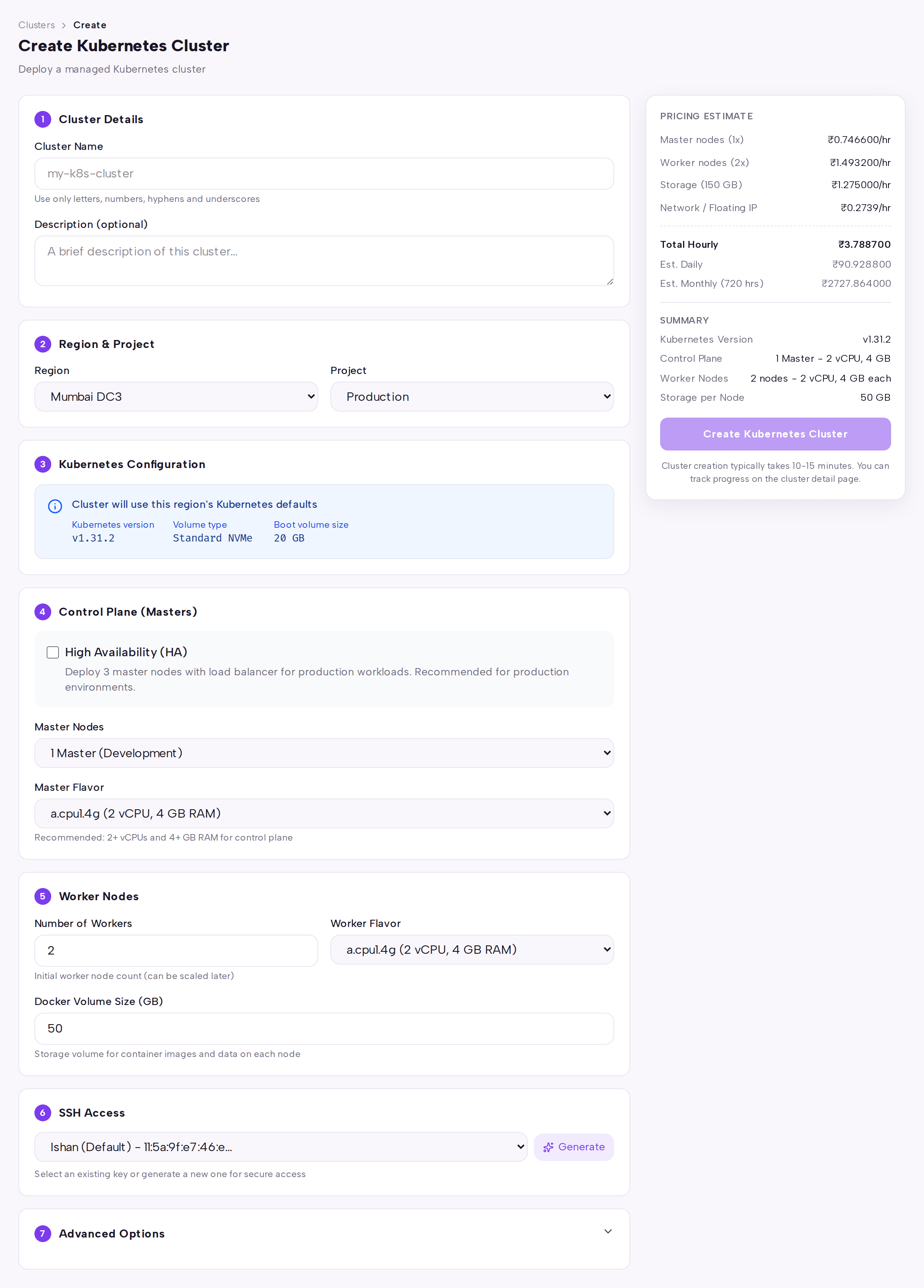
Click Create Kubernetes Cluster. The cluster record appears immediately and provisioning continues in the background — expect the status to sit at
CREATE_IN_PROGRESSfor a while before it reachesCREATE_COMPLETE.Open the cluster from the list to reach its detail page. The Overview tab shows status, API endpoint, network and subnet, and the keypair; Nodes lists master and worker addresses; Security covers CA rotation history; Billing shows the cost breakdown.

Use the detail-page actions as needed: Kubeconfig to download credentials, Resize to change the worker node count, Upgrade to move to a new cluster template, Rotate CA to issue a new cluster certificate authority, and Delete to tear the cluster down.
API
All calls use the base host https://app.cloudpe.com and a bearer token.
List the templates and networks available in a region before creating:
curl https://app.cloudpe.com/api/v1/k8s/templates \
  -H "Authorization: Bearer <API_KEY>"

curl https://app.cloudpe.com/api/v1/k8s/networks \
  -H "Authorization: Bearer <API_KEY>"
Estimate the price of a proposed cluster:
curl -X POST https://app.cloudpe.com/api/v1/k8s/pricing/estimate \
  -H "Authorization: Bearer <API_KEY>" \
  -H "Content-Type: application/json" \
  -d '{
        "cluster_template_id": "<template-id>",
        "region_id": "<region-id>",
        "project_id": "<project-id>",
        "master_count": <master-count>,
        "node_count": <node-count>,
        "master_flavor_id": "<flavor-id>",
        "node_flavor_id": "<flavor-id>",
        "docker_volume_size": <gb>,
        "floating_ip_enabled": true
      }'
Create a cluster:
curl -X POST https://app.cloudpe.com/api/v1/k8s/ \
  -H "Authorization: Bearer <API_KEY>" \
  -H "Content-Type: application/json" \
  -d '{
        "name": "prod-cluster",
        "project_id": "<project-id>",
        "region_id": "<region-id>",
        "ssh_key_id": "<ssh-key-id>",
        "node_count": <node-count>,
        "is_ha": true,
        "node_flavor_id": "<flavor-id>",
        "master_flavor_id": "<flavor-id>",
        "docker_volume_size": <gb>,
        "fixed_network": "<network-id>",
        "fixed_subnet": "<subnet-id>",
        "floating_ip_enabled": true,
        "create_timeout": <minutes>,
        "labels": {}
      }'
Other cluster operations:
| Operation | Method + path |
|---|---|
| List clusters | GET /api/v1/k8s/ |
| Get a cluster | GET /api/v1/k8s/{cluster_id} |
| Rename / re-describe | PATCH /api/v1/k8s/{cluster_id} |
| Delete | DELETE /api/v1/k8s/{cluster_id} |
| Download kubeconfig | GET /api/v1/k8s/{cluster_id}/kubeconfig |
| Resize workers | POST /api/v1/k8s/{cluster_id}/resize |
| Upgrade | POST /api/v1/k8s/{cluster_id}/upgrade |
| Rotate CA | POST /api/v1/k8s/{cluster_id}/rotate-ca |
| List CA rotations | GET /api/v1/k8s/{cluster_id}/ca-rotations |
| List worker groups | GET /api/v1/k8s/{cluster_id}/worker-groups |
| Create worker group | POST /api/v1/k8s/{cluster_id}/worker-groups |
| Update worker group | PATCH /api/v1/k8s/{cluster_id}/worker-groups/{worker_group_id} |
| Delete worker group | DELETE /api/v1/k8s/{cluster_id}/worker-groups/{worker_group_id} |
Scale the default workers, optionally naming the nodes to drain first when scaling down:
curl -X POST https://app.cloudpe.com/api/v1/k8s/<cluster-id>/resize \
  -H "Authorization: Bearer <API_KEY>" \
  -H "Content-Type: application/json" \
  -d '{
        "node_count": <node-count>,
        "nodes_to_remove": ["<node-id>"]
      }'
Add a worker group with autoscaling bounds:
curl -X POST https://app.cloudpe.com/api/v1/k8s/<cluster-id>/worker-groups \
  -H "Authorization: Bearer <API_KEY>" \
  -H "Content-Type: application/json" \
  -d '{
        "name": "gpu-pool",
        "node_count": <node-count>,
        "flavor_id": "<flavor-id>",
        "docker_volume_size": <gb>,
        "autoscaling_enabled": true,
        "min_node_count": <min>,
        "max_node_count": <max>,
        "labels": {}
      }'
Limits & billing
- The worker node count and the create timeout are both range-checked by the API; values outside the accepted range are rejected on submit.
- HA mode requires the minimum master count for HA and the master load balancer; the platform sets both for you when HA is enabled.
- Clusters are metered hourly. The per-hour figure shown on a cluster's usage-details row is compute only — the control-plane fee plus master and worker node rates, scaled by node count.
- Node volumes (the per-node Docker volume) and the API floating IP are metered and billed separately; they appear as their own line items in the Billing tab of the cluster detail page.
- Usage starts when the cluster (or worker group) finishes provisioning and stops when it is deleted. Prepaid organizations are debited from the wallet on an hourly cycle.
- Create and estimate fail if a required flavor tariff is missing in your region, rather than quoting a zero-rated cluster.
- A project cannot be deleted while it still holds Kubernetes clusters.
Troubleshooting
| Message | What it means | What to do |
|---|---|---|
Kubernetes is not enabled for this region |
The selected region does not offer Kubernetes. | Pick a region that appears in the create page's region list. |
Kubernetes (Magnum) is not configured for this region |
The region is missing its Kubernetes service configuration. | Choose another region or contact support. |
Region {…} is missing required Kubernetes defaults: {…}. Ask an admin to populate them under /admin/regions/{…}. |
Region-level Kubernetes defaults are incomplete. | Contact support or your platform admin to populate the defaults. |
Selected project is not fully provisioned yet. Wait until the project is ACTIVE before creating a Kubernetes cluster. |
The project is still being created in the region. | Wait for the project status to become ACTIVE and retry. |
Selected project is not in the requested region |
Project and region do not match. | Select a project that exists in the chosen region. |
Network '{…}' has no router with an external gateway — Kubernetes nodes need internet access to bootstrap. Attach a router to this network or choose another network. |
The chosen fixed network has no route out. | Attach a router with an external gateway to the network, or pick a routed network. |
External network '{…}' not found or not accessible to this project |
The external network override is not visible to the project. | Clear the override or choose an external network your project can use. |
SSH key not found in the selected project's organization |
The SSH key belongs to a different organization. | Create or select a key in the project's organization. |
Cluster template not found, inactive, or not available in this region |
The template is disabled or belongs to another region. | Re-select a template from the region's list. |
HA mode requires at least 3 master nodes |
HA was requested with too few masters. | Leave the master count unset so HA sets it, or raise it to the HA minimum. |
HA mode requires master load balancer to be enabled |
HA was requested without the control-plane load balancer. | Enable the master load balancer (the platform sets it automatically when the master count qualifies). |
Failed to enqueue cluster provisioning. Please retry. |
The background provisioning job could not be queued. | Retry the create; if it repeats, contact support. |
Cannot resize cluster in {…} state |
Another lifecycle operation is still running. | Wait for the current operation to finish, then retry. |
nodes_to_remove is only valid when scaling down |
Node IDs were supplied on a scale-up request. | Omit nodes_to_remove when increasing the node count. |
Cannot add worker group when cluster is in {…} state |
The cluster is busy with another operation. | Wait until the cluster settles, then add the worker group. |
A worker group named '{…}' already exists on this cluster |
Worker group names must be unique per cluster. | Choose a different worker group name. |
min_node_count cannot exceed max_node_count |
Autoscaling bounds are inverted. | Correct the bounds so the minimum is not above the maximum. |
Cluster must be CREATE_COMPLETE to rotate CA (current status: {…}) |
CA rotation needs a fully created cluster. | Wait until the cluster reaches CREATE_COMPLETE, then retry the rotation. |
Kubeconfig not available for cluster in {…} state |
The cluster has not finished provisioning. | Wait for provisioning to complete, then download the kubeconfig. |
Cannot delete cluster in '{…}' state — wait for the current operation to finish |
A lifecycle operation is in flight. | Wait for it to finish and retry the delete. |
Unable to connect to Kubernetes service in this region. Please try again later or contact support. ({…}) |
The regional Kubernetes service is unreachable. | Retry shortly; if it persists, contact support. |
Complete identity verification to create cloud resources. |
KYC is not complete. | Finish identity verification and retry. |
FAQ
How long does provisioning take? Cluster creation runs asynchronously and typically takes a while — the create timeout you set is the upper bound the platform waits before marking the cluster failed.
Can I change the cluster after creation? You can rename it and change its description, resize the default worker group, add or remove worker groups, upgrade to a new cluster template and rotate the CA. Region, project and network are fixed at create time.
How do I scale a specific worker group instead of the whole cluster? Use the worker-group update endpoint on that group, or the worker-group controls on the cluster detail page. The cluster resize action changes the default worker count.
Can I choose which nodes get removed when scaling down?
Yes, via the API: pass nodes_to_remove on the resize call with exactly as many node IDs as the reduction. If you omit it, the platform selects the nodes.
What happens to my workloads when I delete a cluster? Everything running on the cluster is destroyed. Back up anything you need first, and delete all clusters in a project before you delete the project.