

Managed database clusters
Overview
Managed Databases (DBaaS) provisions and runs database clusters for you: CloudPe creates the virtual machines, storage, network access and load balancing, installs the engine, and keeps a guest agent on every node for health, backups, users and configuration. You manage the cluster from Databases in the console or from the public API.
The catalogue currently offers MariaDB 11.8, MongoDB 8.0.20, MySQL 8.4 and PostgreSQL 18, in the topologies your chosen plan allows (standard, primary-replica, ha, replica-set). Plans are region-scoped, so the plan list changes with the region you pick.
Managed Databases is in beta — the Databases entry in the PLATFORM group of the sidebar carries a beta pill, and behaviour may change between releases.
Before you start
- Identity verification: your organization must have completed KYC before it can create cloud resources.
- Wallet balance: cluster creation runs through the billable-create gate, so your organization needs enough balance for the estimated hourly charge.
- Permissions:
databases:readto view clusters,databases:createto provision one,databases:updateto change users, databases, firewall rules, configuration and replicas, anddatabases:deleteto remove a cluster or its users and databases. - Organization membership: the DBaaS API is scoped to your organization; a user with no organization cannot create a cluster.
- Project: you do not need to pick one. If
project_idis omitted, the cluster is auto-assigned to the region's DBaaS service project. - Region: DBaaS must be enabled in the region you choose. Available regions are Mumbai DC2 Zone A, Mumbai DC2 Zone B and Mumbai DC3; the plan list tells you which of them can serve your engine.
- Quota: your organization is limited to 5 clusters, 5 nodes per cluster and 500 of storage by default.
Steps
In the sidebar, open Databases. The Managed Databases page lists every cluster in your organization with its engine, topology and status.
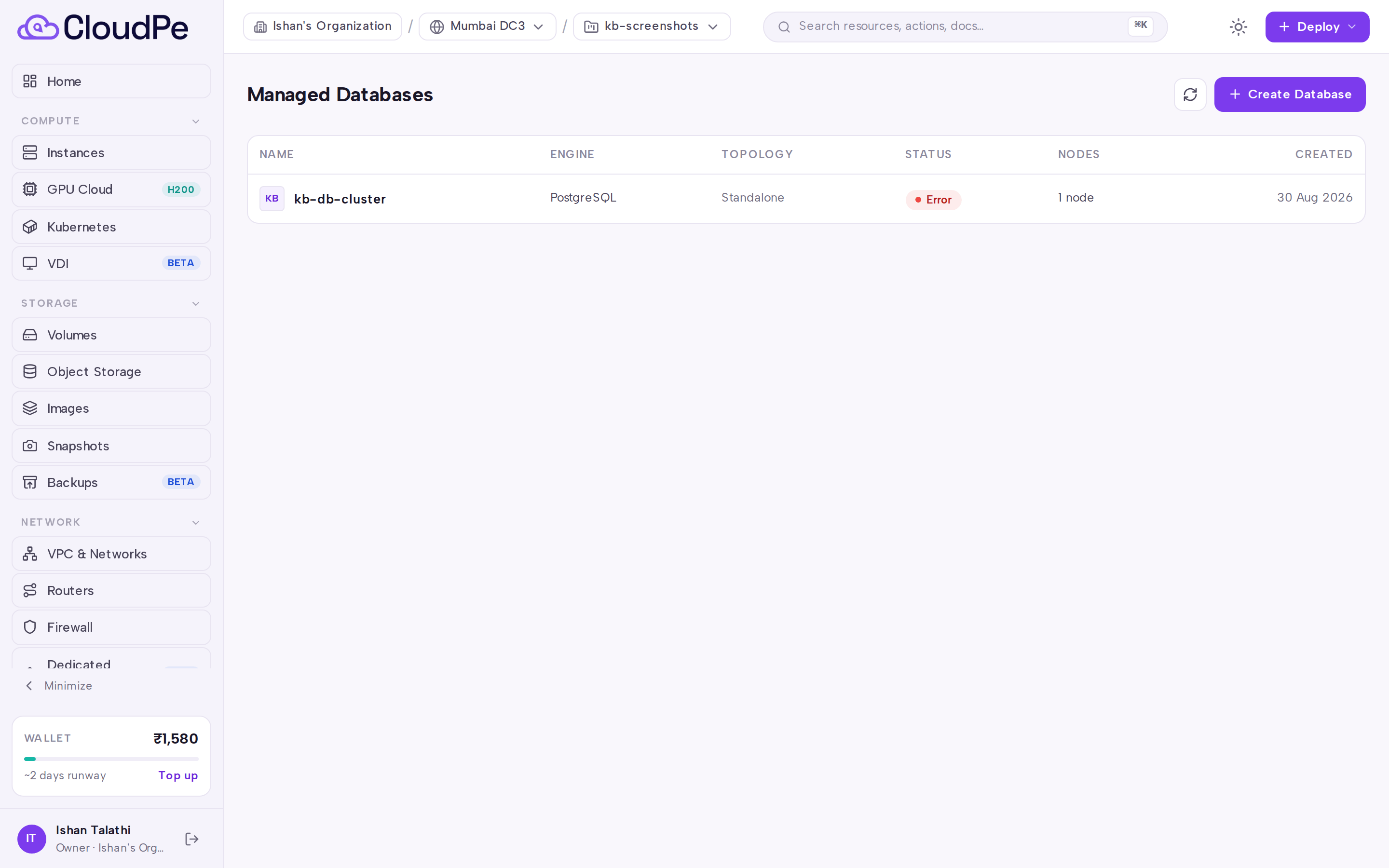
Click Create Database to open the Create Managed Database wizard.
Under Engine & Version, choose the database engine and, optionally, a specific version. If you leave the version unset, the default version for that engine is used.
Under Plan & Storage, choose the region and the plan. The plan fixes vCPU, RAM, base disk and storage policy; add extra storage here if the plan's base disk is not enough.
Under Topology, choose how many nodes the cluster runs and how they replicate. Standard is a single node; primary-replica adds read replicas; ha and replica-set are fixed multi-node clusters with automatic failover. The node count is capped by your plan's replica limit and by your organization quota.
Under Details, give the cluster a name (start with a letter; letters, digits, hyphens and underscores after that), optionally name an initial database, and choose whether the cluster is reachable publicly or only over a private network. You can also seed firewall rules here.
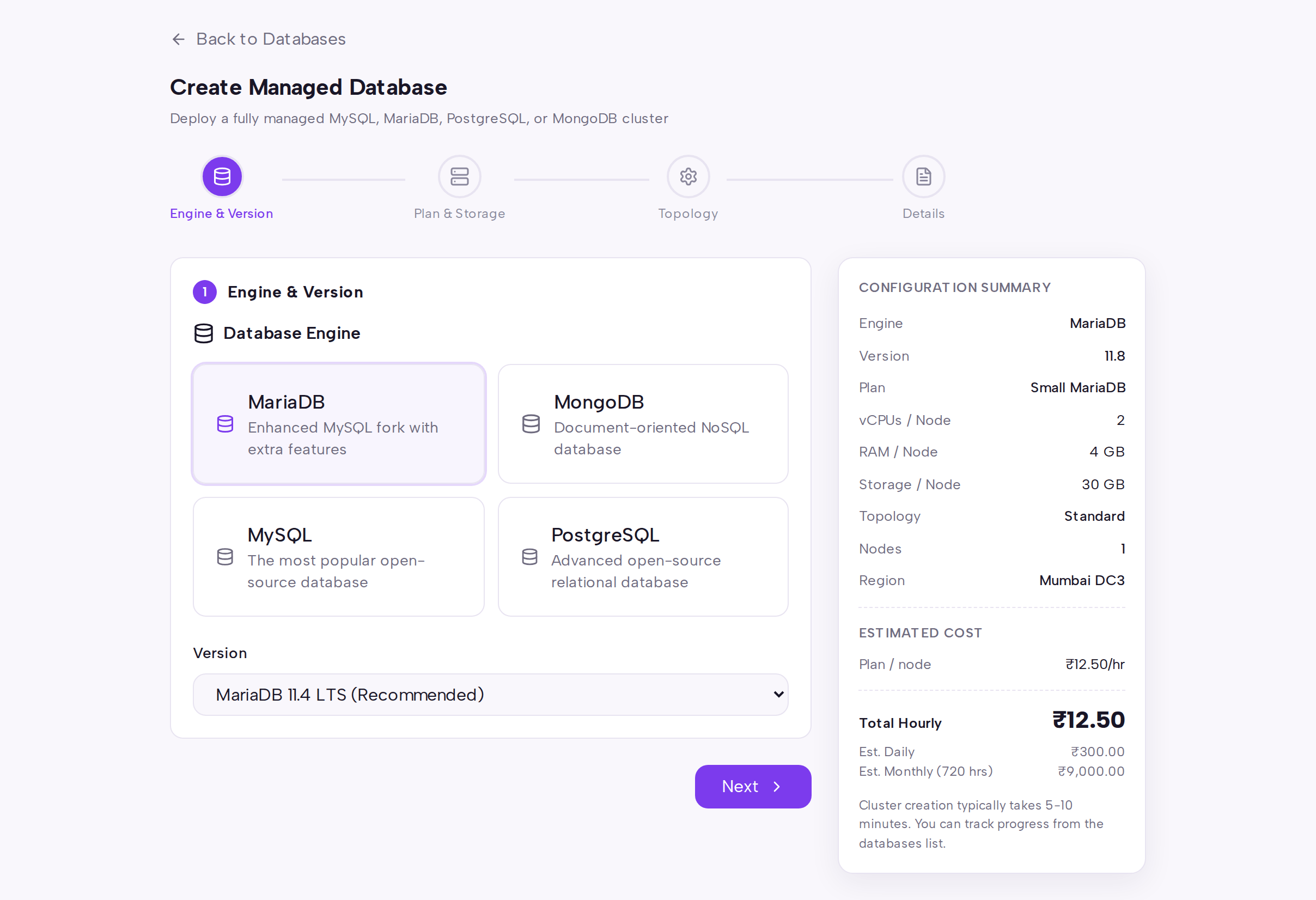
Click Next through the remaining steps and submit. Provisioning is asynchronous: the cluster is created in a building state and the console returns you to the list. Use Back to Databases at any point to abandon the wizard.
Open the cluster to follow provisioning and manage it. The detail page has Overview, Connection, Nodes, Users, Databases, Backups, Configuration, Firewall, Events and Monitoring tabs, plus Refresh, Trigger Backup, Add User, Create Database and Delete actions.
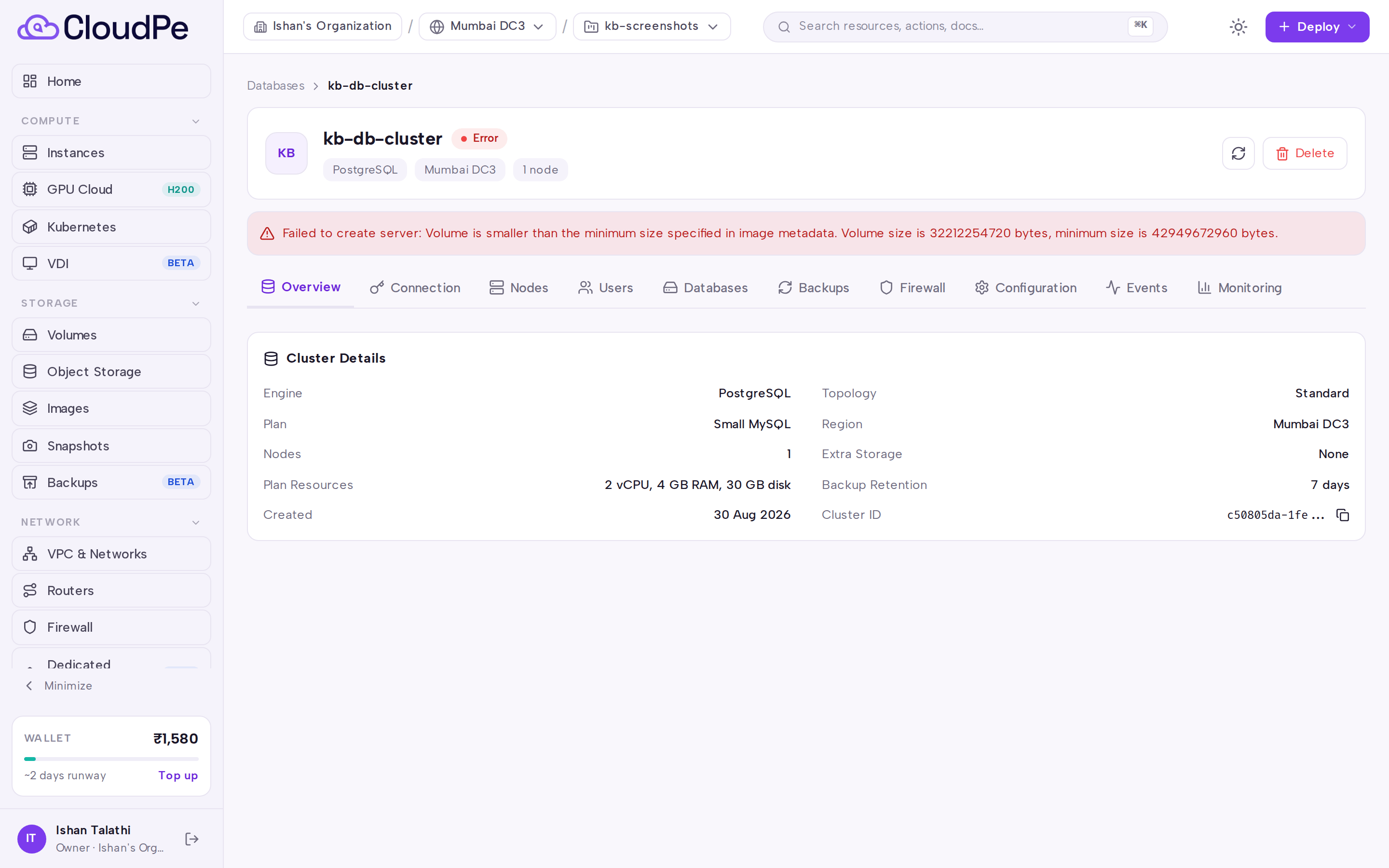
When the cluster reports as running, take the host, port and credentials from the Connection tab and allow your client's address on the Firewall tab before connecting.
API
All calls use the host https://app.cloudpe.com and a Bearer API key. GET /api/v1/databases/engines and GET /api/v1/databases/plans are the discovery calls you make first.
| Method | Path | Purpose |
|---|---|---|
| GET | /api/v1/databases/engines |
List engines and versions |
| GET | /api/v1/databases/plans |
List plans for a region |
| GET | /api/v1/databases/plans/{plan_id}/estimate |
Estimate plan cost |
| POST | /api/v1/databases/ |
Create a cluster |
| GET | /api/v1/databases/ |
List clusters |
| GET | /api/v1/databases/{cluster_id} |
Get one cluster |
| DELETE | /api/v1/databases/{cluster_id} |
Delete a cluster |
| GET | /api/v1/databases/{cluster_id}/nodes |
List nodes |
| GET | /api/v1/databases/{cluster_id}/metrics |
Cluster metrics |
| GET | /api/v1/databases/{cluster_id}/events |
Cluster events |
| POST | /api/v1/databases/{cluster_id}/replicas |
Add a replica |
| DELETE | /api/v1/databases/{cluster_id}/replicas/{instance_id} |
Remove a replica |
| POST | /api/v1/databases/{cluster_id}/replicas/{instance_id}/promote |
Promote a replica |
Create a cluster:
curl -X POST https://app.cloudpe.com/api/v1/databases/ \
  -H "Authorization: Bearer <API_KEY>" \
  -H "Content-Type: application/json" \
  -d '{
    "name": "app-db",
    "engine": "mysql",
    "plan_id": "<plan_id>",
    "region_id": "<region_id>",
    "topology": "standard",
    "num_nodes": 1,
    "connectivity_mode": "public",
    "initial_database": "appdb"
  }'
Other accepted body fields are engine_version_id, extra_storage_gib, firewall_rules, project_id and template_id. The engine field accepts mysql, mariadb or mongodb; topology accepts standard, primary-replica, ha or replica-set; connectivity_mode accepts public or private.
Get a price quote before you create:
curl "https://app.cloudpe.com/api/v1/databases/plans/<plan_id>/estimate" \
  -H "Authorization: Bearer <API_KEY>"
Limits & billing
- Default per-organization quotas: 5 clusters, 5 nodes per cluster, 500 of storage and 10 backups per cluster. Contact support if you need them raised.
- Each plan sets its own replica ceiling and the list of topologies it may run, so a plan that does not allow
hacannot be used for an HA cluster. - Clusters are billed hourly while they are running: the plan rate is charged per node, and extra storage is charged on top. Charges are debited from the organization wallet, and billing stops once the cluster is destroyed.
GET /api/v1/databases/plans/{plan_id}/estimatereturns the hourly, daily and monthly figures for a given region, node count and extra storage, priced for your own organization. The console shows the same engine quote — it never computes prices of its own, so a money figure may render as a dash while the quote is loading.
Troubleshooting
| Message | Cause | Fix |
|---|---|---|
| "DBaaS is not enabled for this region" | Managed Databases has not been turned on for the region you selected. | Pick a region that appears in the plan list, or ask support to enable DBaaS there. |
| "User has no organization" | The calling account is not a member of any organization, so the cluster has no owner or wallet. | Join or create an organization, then retry the request. |
| "Complete identity verification to create cloud resources." | KYC is not complete for the account. | Finish identity verification, then create the cluster. |
| "Plan not found" | The plan_id in the request does not match an active plan. |
Re-fetch GET /api/v1/databases/plans for your region and use an id from that response. |
| "Region not found" | The region_id does not match a known region. |
Use a region id returned by the plan list. |
| "Engine version not found" | The engine_version_id does not match an active version for the engine. |
Omit the field to take the default version, or use an id from GET /api/v1/databases/engines. |
| "Cluster not found" | The cluster id is wrong, or the cluster belongs to another organization or has been deleted. | Confirm the id with GET /api/v1/databases/. |
FAQ
How long does provisioning take? Creation is asynchronous. The API returns as soon as the records are made and the background workflow builds volumes, VMs and, for multi-node topologies, the load balancer. Watch the Events tab for progress.
Can I change the plan or topology after creation? Topology is fixed at creation. For primary-replica clusters you can add and remove read replicas, and promote a replica to primary, from the Nodes tab or the replica endpoints.
Do I have to pick a project?
No. Leave project_id out and the cluster lands in the region's DBaaS service project automatically. Access is checked against your organization, not the project.
How do I connect? Use the host and port on the Connection tab. For public clusters, add your client's address on the Firewall tab first; a private cluster is reachable only from inside your network.
What happens to backups when I delete a cluster? Deletion tears down the nodes, storage and load balancer and stops billing. Take and download anything you still need before deleting.