

Database backups and restores
Overview
Managed database clusters keep full backups of the cluster data so you can recover from data loss or roll back a bad change. Backups are taken on demand from the cluster detail page and streamed off the node to object storage, so they do not consume disk space on the database VM itself.
This article covers listing the backups that exist for a cluster, triggering a new one, and restoring a backup into a new database cluster. Managed Databases is a beta feature, and self-service restore is currently available for Redis clusters; other engines are coming.
Before you start
- Your account must have a verified organization. Backup and restore calls are authorised against the organization that owns the cluster, not a project.
- You need the
databases:readpermission to view backups,databases:updateto trigger one, anddatabases:createto restore a backup into a new cluster. - The cluster must already exist and be reachable — see PostgreSQL clusters if you have not created one yet.
- Backups count against your per-cluster backup quota and your DBaaS storage quota. Check both before starting a large backup.
Steps
- In the sidebar, open Databases.
- Select the cluster you want to back up to open its detail page.
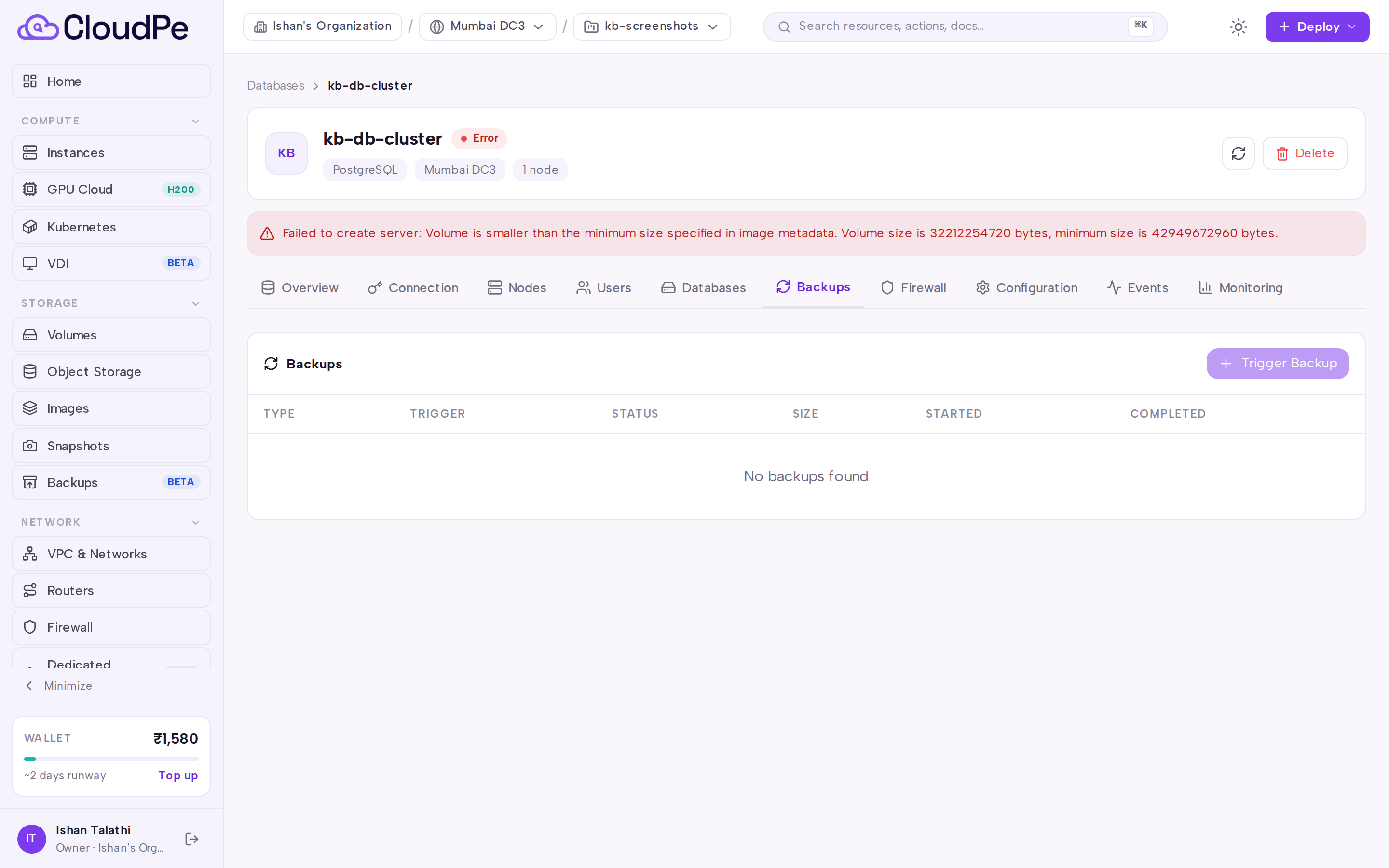
- Open the Backups tab. The Backups panel lists the backups currently held for this cluster.
- Select Trigger Backup to start a new full backup of the cluster.
- Use Refresh to update the list while the backup runs — the entry appears in the Backups panel once the node reports it.
Restoring from a backup
Self-service restore creates a new managed database cluster from a completed backup. The source cluster is not modified:
- Open the Backups tab on the cluster detail page.
- On any completed backup, select "Restore to new database".
- In the "Restore to new database" dialog, configure the target cluster:
- Enter a cluster name (defaults to
<cluster_name>-restore). - Select a plan. The target plan must be the same size or larger than the source plan across vCPU, RAM, and disk storage.
- Specify extra storage if required.
- Choose the network source (create a new private network or select an existing network).
- Optionally toggle public access.
- Enter a cluster name (defaults to
- Select the confirmation button to start the restore.
Self-service restore is currently available for Redis clusters; other engines are coming. For engines where self-service restore is not yet available, the "Restore to new database" action is disabled with the tooltip "Restore is not yet available for <Engine> clusters". To restore clusters on unsupported engines, open a ticket from Support Tickets with the cluster ID and the backup ID.
Key restore details:
- Topology: Restores always provision a single-node Standard topology cluster.
- Credentials: Database users, passwords, and permissions carry over from the source cluster.
- Billing: Restored clusters are billed on an hourly billing cycle starting when the new cluster reaches the running state. No charges are incurred while the cluster is restoring.
API
Backup and restore operations are available on the public API. Replace <cluster_id> with the cluster ID and <backup_id> with the backup ID from the detail page URL.
List the backups held for a cluster (requires databases:read):
curl https://app.cloudpe.com/api/v1/databases/<cluster_id>/backups \
  -H "Authorization: Bearer <API_KEY>"
Trigger a new backup (requires databases:update):
curl -X POST https://app.cloudpe.com/api/v1/databases/<cluster_id>/backups \
  -H "Authorization: Bearer <API_KEY>"
Restore a backup into a new cluster (requires databases:read on the source and databases:create in the organization):
curl -X POST https://app.cloudpe.com/api/v1/databases/<cluster_id>/backups/<backup_id>/restore \
  -H "Authorization: Bearer <API_KEY>" \
  -H "Content-Type: application/json" \
  -d '{"name": "redis-restored", "plan_id": "<plan_id>"}'
| Method | Path |
|---|---|
| GET | /api/v1/databases/{cluster_id}/backups |
| POST | /api/v1/databases/{cluster_id}/backups |
| POST | /api/v1/databases/{cluster_id}/backups/{backup_id}/restore |
Limits & billing
- Each cluster retains up to 10 backups by default. Trigger a new backup only when you have room, or remove older ones first.
- DBaaS storage is capped by your organization quota of 500 GiB by default.
- Cluster charges are calculated by the platform pricing engine from the plan assigned to the cluster and any extra storage on it; the console shows the quote for your organization and region on the cluster's plan selection. Never estimate the figure yourself — if a price has not loaded, the console shows a dash rather than a guess.
- Restored clusters are billed on an hourly billing cycle once the cluster reaches the running state.
Troubleshooting
| Message | Cause | Fix |
|---|---|---|
Cluster not found |
The cluster ID in the URL or API path does not exist, or it belongs to an organization you are not a member of. | Re-open the cluster from Databases and copy the ID from the detail page URL. |
Backup not found |
The backup ID in the request does not exist or does not belong to the specified cluster. | Verify the backup ID on the Backups tab and retry with the correct identifier. |
User has no organization |
The signed-in user is not attached to an organization, so the request cannot be scoped. | Join or create an organization, then retry. |
DBaaS is not enabled for this region |
The region hosting the request does not offer managed databases. | Use a region where Managed Databases is available. |
FAQ
Do backups interrupt the database? Backups stream from the node to object storage without writing temporary files to the data disk, so normal traffic continues. Expect some additional I/O load on the node while the backup runs.
Can I run two backups at once on the same cluster? No. A node processes one backup at a time; trigger the next one after the current backup finishes.
Why does the list not update immediately? The backup is registered once the node reports it. Use Refresh on the Backups tab to re-read the list.
Which permission do my team members need to take a backup or restore one?
databases:update is required to trigger a backup. To restore a backup into a new cluster, team members need databases:read on the source cluster and databases:create in the organization. Read-only members with databases:read can see the list but cannot trigger or restore backups.
Can I restore a backup directly onto the existing cluster? No. Restores always provision a new cluster to protect live data. The source cluster is never modified.
Do user accounts and passwords carry over to the restored cluster? Yes. Database users, privileges, and passwords from the source cluster are automatically cloned to the new cluster.