

Running containers with CloudPe Containers
Overview
CloudPe Containers provides a managed container execution platform for running web applications, APIs, and background workers directly from standard OCI container images without administering underlying Kubernetes clusters or virtual machine operating systems.
Workloads execute within dedicated container environments provisioned on isolated worker nodegroups. CloudPe manages runtime scheduling, rolling deployment lifecycles, health probes, automated TLS certificate provisioning, live log streaming, and predictable capacity-based billing.
Before you start
- To view container environments and services, you require the
containers:readpermission. - Provisioning new environments or creating service definitions requires
containers:create. - Modifying environment states or scaling replicas requires
containers:update. - Deploying new definition revisions requires
containers:deploy. - Managing private registry credentials requires
containers:secrets. - Deleting services or releasing environments requires
containers:delete. - Viewing live container logs requires
containers:logs.
Steps
Create an environment and deploy a service
- In the sidebar, open Containers.
- Select Create Environment to provision a dedicated compute isolation boundary.
- Select Deploy a Container Service to launch the deployment wizard.
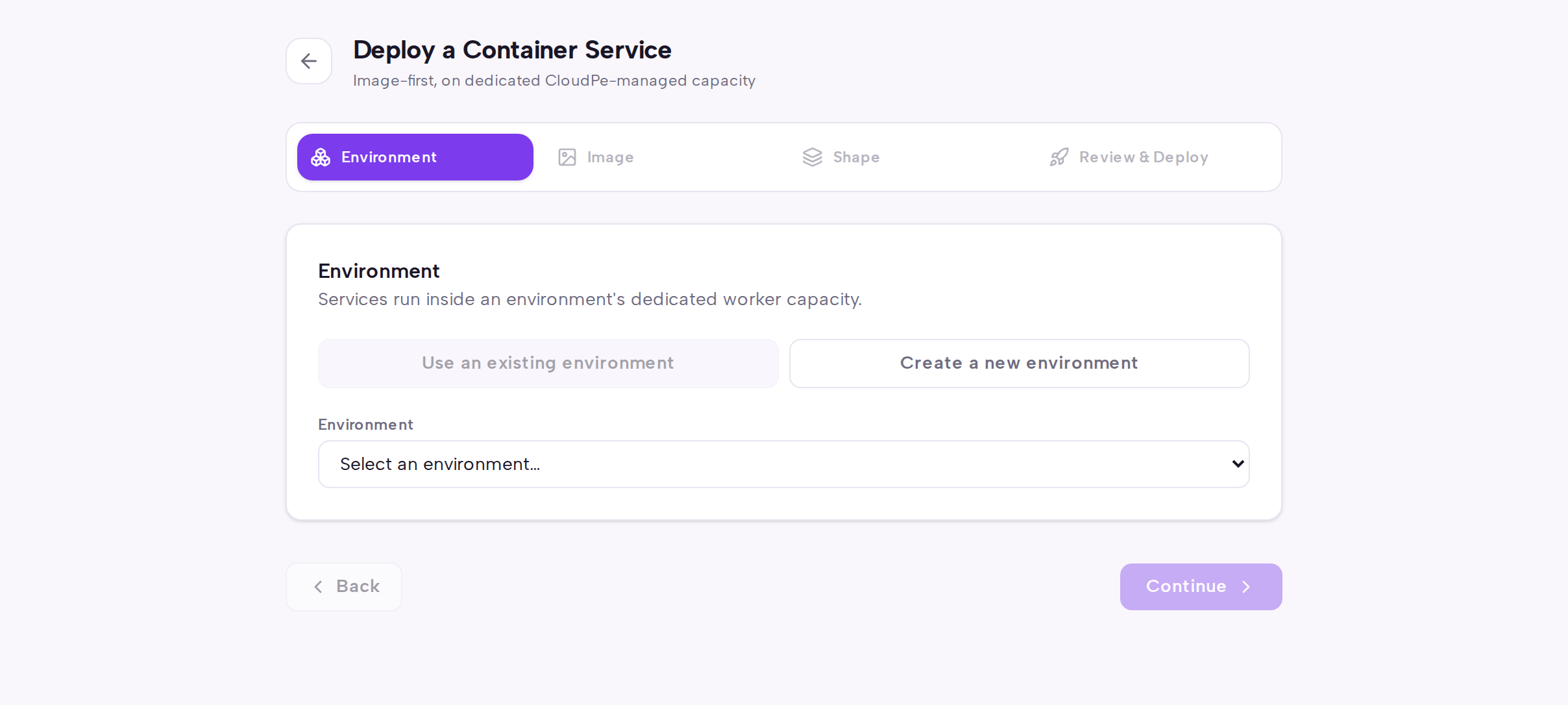 4. On the Environment step, choose an existing environment or configure a new environment name, cloud region, worker flavor, HA toggle, and maximum worker count, then select Continue.
5. On the Image step, enter the OCI container image repository path and tag, choose the service kind and endpoint mode, configure container ports, and select registry credentials if using a private repository, then select Continue.
6. On the Shape step, enter the definition name and service name, select the container shape and desired replicas, and configure environment variables or encrypted secrets, then select Continue.
7. On the Review & Deploy step, verify the service configuration summary and capacity estimate, then select Deploy Service.
4. On the Environment step, choose an existing environment or configure a new environment name, cloud region, worker flavor, HA toggle, and maximum worker count, then select Continue.
5. On the Image step, enter the OCI container image repository path and tag, choose the service kind and endpoint mode, configure container ports, and select registry credentials if using a private repository, then select Continue.
6. On the Shape step, enter the definition name and service name, select the container shape and desired replicas, and configure environment variables or encrypted secrets, then select Continue.
7. On the Review & Deploy step, verify the service configuration summary and capacity estimate, then select Deploy Service.
Manage environment lifecycle
- Navigate to Containers and select an environment from the list.
- On the environment detail page:
- Review the Services section to inspect running workloads, replicas, endpoints, and live logs.
- Select Suspend to stop services and release worker node compute capacity to halt capacity billing.
- Select Resume to reprovision worker capacity and restart scheduled workloads.
- Select Release to permanently delete the environment and its services.
API
Container environments, definitions, services, and credentials can be managed via the REST API.
| Method and path | Permission |
|---|---|
GET /api/v1/containers/environments |
containers:read |
POST /api/v1/containers/environments |
containers:create |
GET /api/v1/containers/environments/{id} |
containers:read |
POST /api/v1/containers/environments/{id}/suspend |
containers:update |
POST /api/v1/containers/environments/{id}/resume |
containers:update |
POST /api/v1/containers/environments/{id}/release |
containers:delete |
GET /api/v1/containers/environments/{id}/usage |
containers:read |
GET /api/v1/containers/registry-credentials |
containers:secrets |
POST /api/v1/containers/registry-credentials |
containers:secrets |
DELETE /api/v1/containers/registry-credentials/{id} |
containers:secrets |
GET /api/v1/containers/definitions |
containers:read |
POST /api/v1/containers/definitions |
containers:create |
GET /api/v1/containers/definitions/{id} |
containers:read |
POST /api/v1/containers/definitions/{id}/revisions |
containers:create |
GET /api/v1/containers/definitions/{id}/revisions |
containers:read |
GET /api/v1/containers/services |
containers:read |
POST /api/v1/containers/services |
containers:create |
GET /api/v1/containers/services/{id} |
containers:read |
POST /api/v1/containers/services/{id}/deploy |
containers:deploy |
POST /api/v1/containers/services/{id}/scale |
containers:update |
POST /api/v1/containers/services/{id}/rollback |
containers:deploy |
POST /api/v1/containers/services/{id}/stop |
containers:update |
DELETE /api/v1/containers/services/{id} |
containers:delete |
GET /api/v1/containers/services/{id}/logs |
containers:logs |
GET /api/v1/containers/operations |
containers:read |
GET /api/v1/containers/operations/{id} |
containers:read |
POST /api/v1/containers/estimates |
containers:read |
List container environments:
curl https://app.cloudpe.com/api/v1/containers/environments \
  -H "Authorization: Bearer <API_KEY>"
Create a container environment:
curl -X POST https://app.cloudpe.com/api/v1/containers/environments \
  -H "Authorization: Bearer <API_KEY>" \
  -H "Content-Type: application/json" \
  -d '{
        "project_id": "<project_id>",
        "region_id": "<region_id>",
        "name": "production-apps",
        "worker_flavor": "a.gp1.8g",
        "ha": true,
        "max_worker_count": 2
      }'
Scale service replicas:
curl -X POST https://app.cloudpe.com/api/v1/containers/services/<service_id>/scale \
  -H "Authorization: Bearer <API_KEY>" \
  -H "Content-Type: application/json" \
  -d '{"desired_replicas": 3}'
Release an environment:
curl -X POST https://app.cloudpe.com/api/v1/containers/environments/<environment_id>/release \
  -H "Authorization: Bearer <API_KEY>"
Limits & billing
- Billing is assessed on dedicated worker nodegroup capacity provisioned for each container environment rather than per-container execution seconds.
- Suspending an environment deprovisions host compute worker nodes and halts capacity billing until resumed.
- Private registry authentication tokens are securely encrypted at rest.
- Public services receive automatically provisioned TLS certificates when ingress routing is enabled.
Troubleshooting
| Message | What it means | What to do |
|---|---|---|
Container environment not found |
The requested environment UUID does not exist in your active organization. | Check the environment list under Containers to verify the environment identifier. |
Container service not found |
The service identifier does not exist or was deleted. | Verify the service identifier in the services list before repeating the request. |
Cannot release environment with active services; pass force=true to delete all services |
An environment release was attempted while container services are still defined. | Delete or stop all active services first, or provide the force parameter. |
No healthy revision to roll back to |
The service does not have a previous known-healthy deployment revision. | Deploy a corrected definition revision manually using the service configuration dialog. |
Public HTTPS endpoints are not available in this region |
Ingress routing and public TLS endpoints have not been enabled in the selected region. | Choose an alternate region supporting public container ingress. |
FAQ
How is tenant isolation maintained in CloudPe Containers? Each environment provisions dedicated compute worker nodes on CloudPe cloud infrastructure with strict kernel-level namespace separation and isolated security policies.
Can I run background worker tasks without exposed public ports? Yes. Services can be configured without ingress endpoints to run internal queues, schedulers, and processing tasks.
What happens to my running workloads when an environment is suspended? All active containers in the environment are safely stopped and dedicated worker nodes are released to suspend compute billing.