

Firewall rules (security groups)
Overview
Security groups are the per-project firewall in CloudPE. Each group is a named set of rules that allow traffic; rules are additive, so a packet is permitted if any attached group allows it. Groups are attached to instance network interfaces, which means you can maintain one group per role (web, database, bastion) and reuse it across virtual machines in the same project and region.
Manage them under NETWORK → Firewall (/dashboard/security-groups), where the page is titled Security Groups.
Before you start
- Your account must belong to a project in the region where the group will live. Security groups are project- and region-scoped, so a group created in one region cannot be attached to an instance in another.
- You need the
security_groups:readpermission to view the Firewall page,security_groups:createto add a group,security_groups:updateto add rules andsecurity_groups:deleteto remove groups or rules. - To attach or detach a group on a running instance's interface you also need
vms:update. - Security group creation counts against your project quota; if the quota is full, ask an administrator to raise it before you continue.
Steps
Open NETWORK → Firewall in the dashboard. The list shows the security groups that exist in the selected project and region, along with their rules.
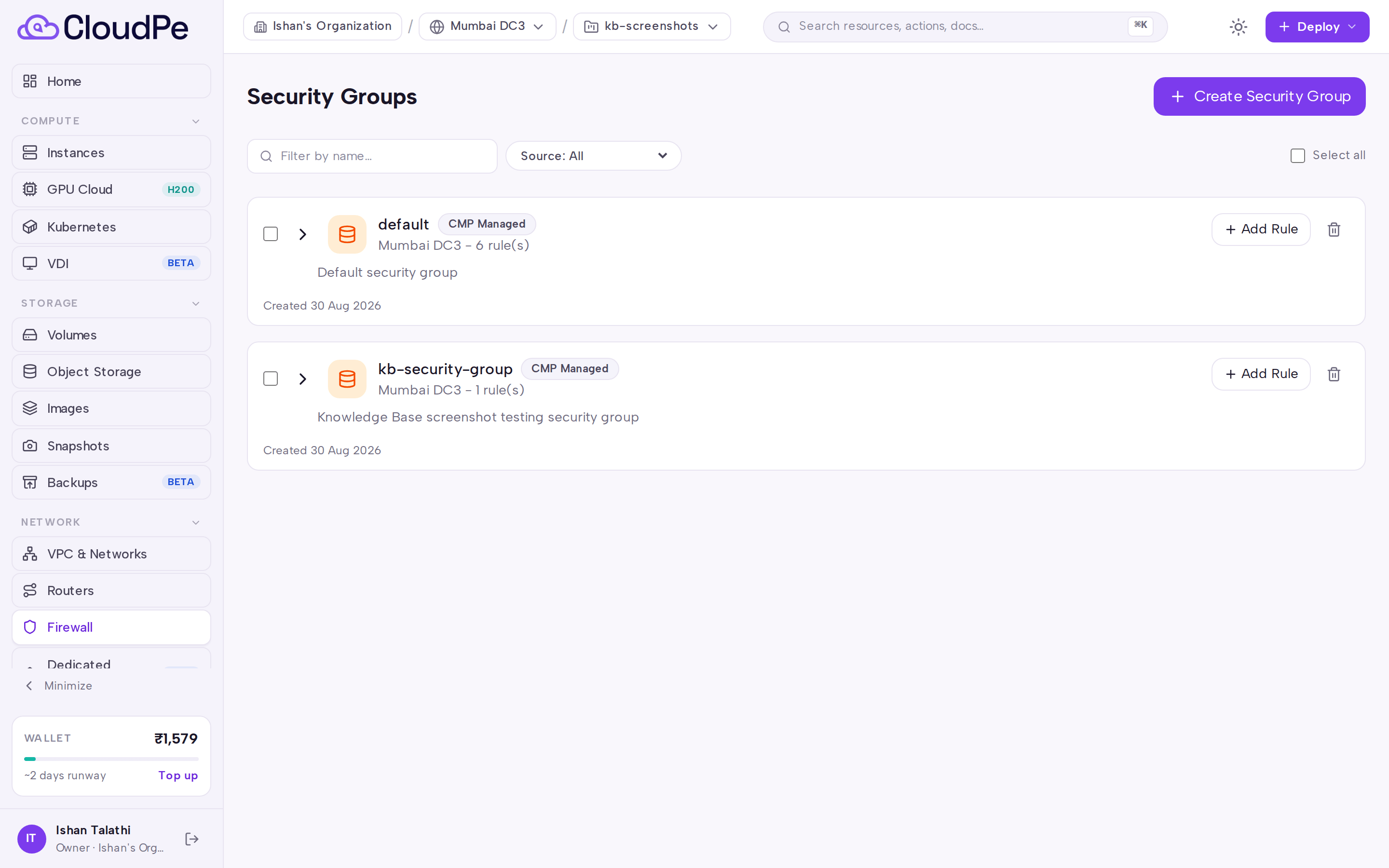
Select Create Security Group. In the Create Security Group dialog, give the group a name and description that make its purpose obvious — you will pick it from a list when launching instances.
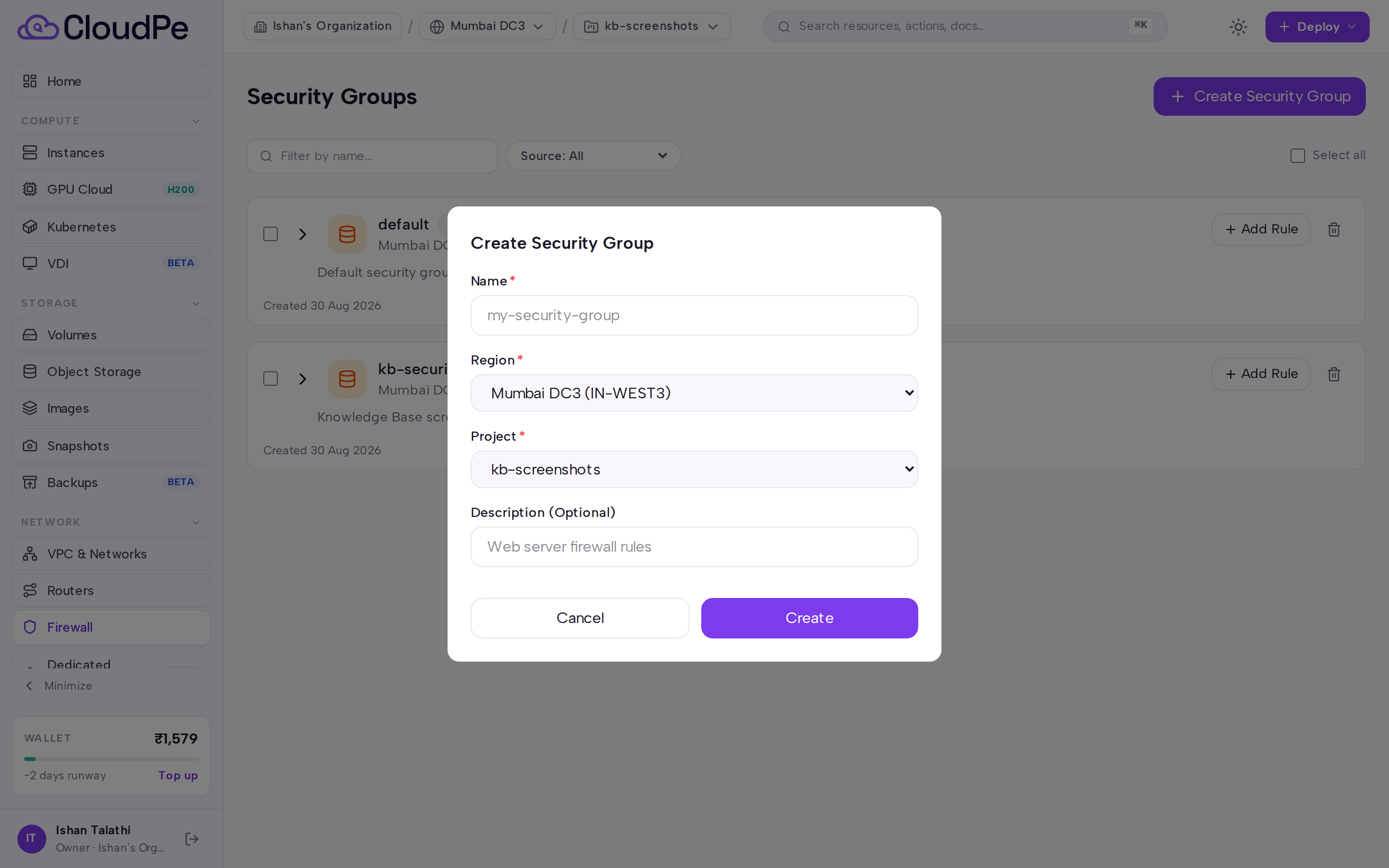
Save the group. CloudPE creates the matching group in the cloud infrastructure; wait until it is provisioned before adding rules to it.
Add rules to the group. For each rule choose the direction (ingress for inbound traffic, egress for outbound), the protocol, and the port range. When you restrict a single port, set the low and high ends of the range to the same value.
Attach the group to a workload. Select it while creating a virtual machine, or add it to an existing instance's network interface from the instance's networking view. Because rules are additive, attaching a second group widens what is allowed rather than narrowing it.
To close access, delete the specific rule rather than the whole group — deleting a group that is still attached leaves the instance without those allowances.
API
The following operations are available for security groups. Substitute <sg_id>, <rule_id>, <instance_id>, <port_id> and <sg_openstack_id> with real identifiers.
| Method + path | Permission |
|---|---|
GET /api/v1/security-groups |
security_groups:read |
POST /api/v1/security-groups |
security_groups:create |
GET /api/v1/security-groups/{sg_id} |
security_groups:read |
GET /api/v1/security-groups/{sg_id}/history |
security_groups:read |
DELETE /api/v1/security-groups/{sg_id} |
security_groups:delete |
POST /api/v1/security-groups/{sg_id}/rules |
security_groups:update |
DELETE /api/v1/security-groups/{sg_id}/rules/{rule_id} |
security_groups:delete |
GET /api/v1/instances/{instance_id}/security-groups |
vms:read |
POST /api/v1/instances/{instance_id}/interfaces/{port_id}/security-groups |
vms:update |
DELETE /api/v1/instances/{instance_id}/interfaces/{port_id}/security-groups/{sg_openstack_id} |
vms:update |
List the groups visible to your token:
curl https://app.cloudpe.com/api/v1/security-groups \
  -H "Authorization: Bearer <API_KEY>"
Add an ingress rule that allows SSH:
curl -X POST https://app.cloudpe.com/api/v1/security-groups/<sg_id>/rules \
  -H "Authorization: Bearer <API_KEY>" \
  -H "Content-Type: application/json" \
  -d '{"direction":"ingress","protocol":"tcp","port_range_min":22,"port_range_max":22}'
Remove a rule:
curl -X DELETE https://app.cloudpe.com/api/v1/security-groups/<sg_id>/rules/<rule_id> \
  -H "Authorization: Bearer <API_KEY>"
Limits & billing
Security groups and their rules are not billed — there is no hourly charge for a group, and deleting one does not produce a credit. Billing for networking applies to address resources such as floating IPs and public IPs attached to instances, which are metered hourly.
The number of security groups and rules you can create is bounded by your project quota. When the quota is reached, create requests are rejected until existing groups are removed or the quota is increased.
Troubleshooting
| Error | Cause | Fix |
|---|---|---|
Direction must be 'ingress' or 'egress' |
The rule was submitted with an unrecognised direction. | Send ingress for inbound or egress for outbound traffic. |
port_range_min cannot be greater than port_range_max |
The low end of the port range is above the high end. | Swap the values, or set both to the same port for a single-port rule. |
Security group not yet provisioned in cloud infrastructure |
The group was created in CloudPE but its backing object is not ready. | Wait for the group to finish provisioning, refresh the Firewall page, then add the rule again. |
A rule with identical parameters already exists |
The same direction, protocol and port range is already allowed by this group. | No action needed — the traffic is already permitted. Check the existing rule list before adding duplicates. |
Security group not found |
The group id is wrong, was deleted, or belongs to another project or region. | Re-list your groups and confirm you are working in the right project and region. |
Rule not found |
The rule was already deleted, or the id belongs to a different group. | Fetch the group to get its current rules and retry with a valid rule id. |
Project not found |
The request referenced a project you do not have access to in that region. | Switch to a project you are a member of and retry. |
Quota exceeded: {…} |
The project's security group or rule quota is full. | Delete unused groups or rules, or ask an administrator to increase the quota. |
Failed to create security group in cloud infrastructure: {…} |
The provider rejected or failed the create call. | Retry; if it persists, raise a support ticket with the group name, project and region. |
Failed to delete security group in cloud infrastructure: {…} |
The group could not be removed on the provider, often because it is still attached to a port. | Detach the group from all instance interfaces, then delete it again. |
Failed to create security group rule in cloud infrastructure: {…} |
The provider rejected the rule. | Verify the protocol and port range, then retry. |
Failed to delete security group rule in cloud infrastructure: {…} |
The provider failed to remove the rule. | Retry the delete; if it keeps failing, contact support with the group and rule ids. |
Failed to create security group: {…} |
An internal error occurred while recording the group. | Retry the create; report the failure if it recurs. |
Failed to delete security group: {…} |
An internal error occurred while removing the group record. | Retry the delete; report the failure if it recurs. |
FAQ
Do rules deny traffic? No. Security group rules only allow traffic. To block something, remove the rule that permits it rather than adding an opposing rule.
What happens if an instance has two groups attached? The allowances combine. Traffic is permitted if any attached group has a matching rule, so attaching an extra group can only widen access.
Can I use one group across regions? No. A group exists in a single project and region and can only be attached to instances there. Recreate an equivalent group in each region you use.
How do I see what changed on a group?
Retrieve the group's history through GET /api/v1/security-groups/{sg_id}/history.
Can I delete a group that is still in use? Detach it from every instance interface first. Deleting a group that is still attached to a port fails at the infrastructure layer.