

Floating IPs
Overview
A floating IP is a public IPv4 address allocated from an external network pool in a region and held by your project until you release it. You can attach it to an instance to make that instance reachable from the internet, detach it, and re-attach it to a different instance — the address itself stays with your project the whole time.
Floating IPs are managed under NETWORK → Floating IPs in the dashboard, or through the floating IPs API.
Before you start
- You need the
floating_ips:readpermission to view floating IPs,floating_ips:createto allocate,floating_ips:updateto assign or unassign, andfloating_ips:deleteto release. - The project must already be provisioned in OpenStack. A brand-new project that has not finished provisioning cannot allocate an address yet.
- Your project must have floating IP quota available in the target region.
- To attach an address to an instance, the instance's subnet must be attached to a router whose gateway is on the same external network the floating IP was allocated from. Without that router path, the assignment will be rejected.
- The floating IP and the instance must be in the same region and the same project.
Steps
Allocate a floating IP
Go to NETWORK → Floating IPs.
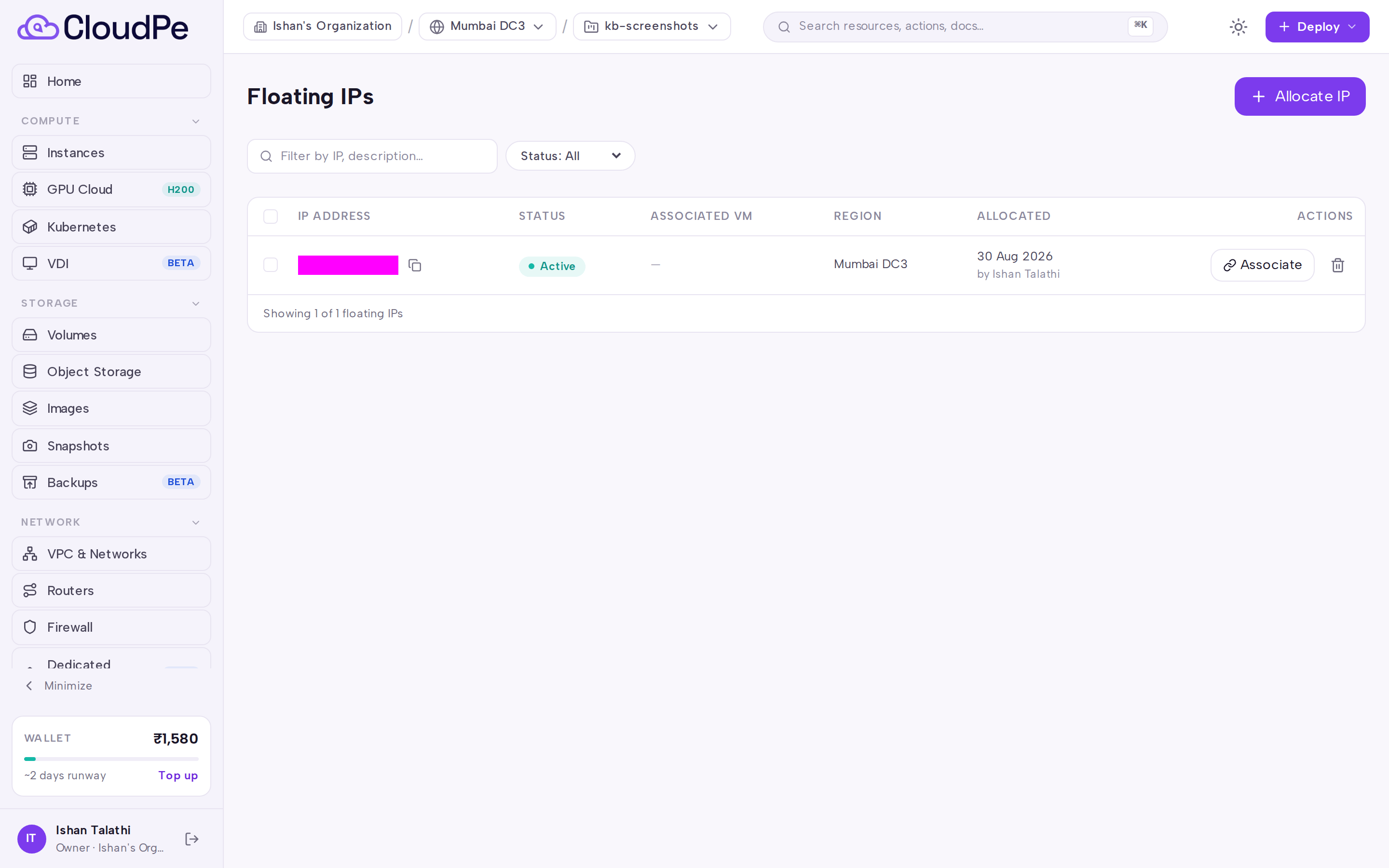
Click Allocate IP. The Allocate Floating IP dialog opens.
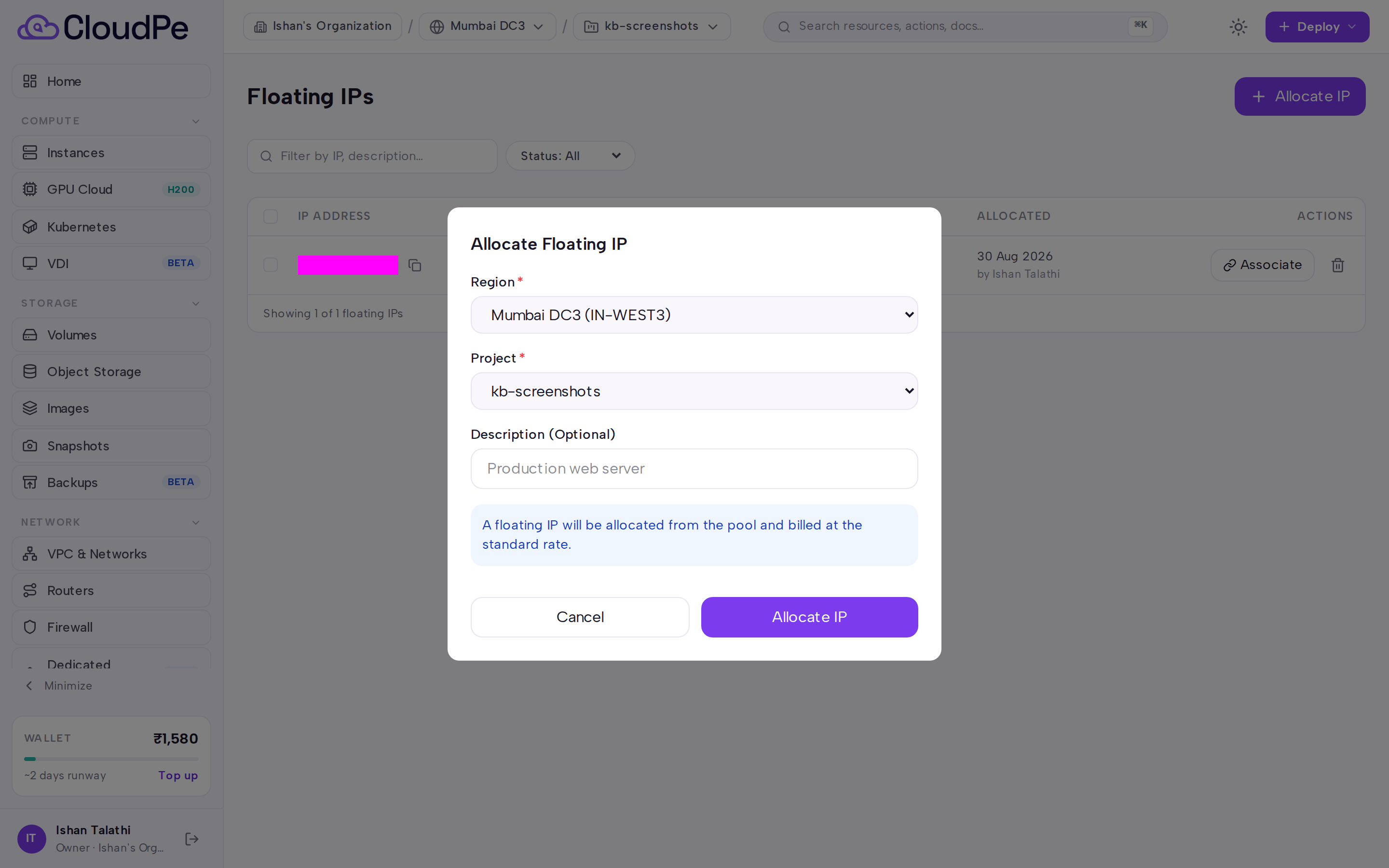
Choose the region and project for the address. Optionally choose the external network to allocate from, and add a description to help you identify the address later.
Confirm. The new address appears in the list once the pool has issued it.
Assign a floating IP to an instance
- On the Floating IPs list, find an address that is not currently assigned.
- Choose the assign action and select the target instance. If the instance has more than one network port, you can narrow the target by supplying the port or the fixed IPv4 address that the floating IP should map to.
- Once assigned, traffic to the public address is forwarded to the instance's private address. Firewall rules on the instance's security groups still apply — open the ports you need under NETWORK → Firewall.
Unassign and release
- Unassigning detaches the address from the instance but keeps it reserved for your project, so you can re-use the same address later.
- Releasing returns the address to the pool permanently. An address must be unassigned before it can be released, and the address is not guaranteed to be available again afterwards.
API
All calls use Authorization: Bearer <API_KEY>.
| Method + path | Purpose |
|---|---|
GET /api/v1/floating-ips |
List floating IPs |
POST /api/v1/floating-ips |
Allocate a floating IP |
GET /api/v1/floating-ips/{ip_id} |
Get one floating IP |
PATCH /api/v1/floating-ips/{ip_id} |
Update a floating IP |
DELETE /api/v1/floating-ips/{ip_id} |
Release a floating IP |
POST /api/v1/floating-ips/{ip_id}/assign |
Assign to an instance |
POST /api/v1/floating-ips/{ip_id}/unassign |
Unassign from an instance |
GET /api/v1/floating-ips/{ip_id}/history |
Get assignment history |
Allocate an address:
curl -X POST https://app.cloudpe.com/api/v1/floating-ips \
  -H "Authorization: Bearer <API_KEY>" \
  -H "Content-Type: application/json" \
  -d '{
    "project_id": "<project_id>",
    "region_id": "<region_id>",
    "description": "web tier ingress"
  }'
project_id and region_id are required; region_id accepts a region slug or UUID. Pass floating_network_id if you want to allocate from a specific external network pool instead of the default one.
Assign it to an instance:
curl -X POST https://app.cloudpe.com/api/v1/floating-ips/<ip_id>/assign \
  -H "Authorization: Bearer <API_KEY>" \
  -H "Content-Type: application/json" \
  -d '{
    "instance_id": "<instance_id>"
  }'
Add port_id to bind to a specific Neutron port, or fixed_ip to bind to the port that owns a given fixed IPv4 address.
Unassign, then release:
curl -X POST https://app.cloudpe.com/api/v1/floating-ips/<ip_id>/unassign \
  -H "Authorization: Bearer <API_KEY>"

curl -X DELETE https://app.cloudpe.com/api/v1/floating-ips/<ip_id> \
  -H "Authorization: Bearer <API_KEY>"
Limits & billing
- The number of floating IPs a project can hold is capped by its quota in each region. Allocation fails once the quota is reached.
- Floating IPs are metered hourly. Metering starts when the address is allocated and stops when it is released — an allocated address that is not assigned to any instance is still billed, so release addresses you no longer need.
- A public IP attached directly to an instance at create time is metered separately from floating IPs, which are allocated and assigned by you.
- Addresses that back a load balancer VIP are managed by the load balancer and cannot be assigned or released independently.
Troubleshooting
| Error | What it means | What to do |
|---|---|---|
Project is not yet provisioned in OpenStack; cannot allocate a floating IP. |
The project has no backing OpenStack tenant yet. | Wait for provisioning to finish, then retry the allocation. |
Quota exceeded: {…} |
The project's floating IP quota in that region is fully used. | Release an address you no longer need, or request a quota increase. |
No external network available for floating IP allocation |
No usable public pool was found for the region. | Retry, and raise a support ticket if it persists. |
Network '{…}' is not accessible for floating IP allocation in project '{…}'. |
The external network you asked for is not shared with this project. | Allocate from the default pool, or use a network your project has access to. |
Floating IP and instance must be in the same region |
The address and the target instance live in different regions. | Allocate an address in the instance's region. |
Floating IP and instance must belong to the same project |
The address and the target instance belong to different projects. | Allocate an address in the instance's project. |
The instance's network has no router path to the external network this floating IP belongs to. Attach the instance's subnet to a router whose gateway is on that external network, then try again. |
The instance's subnet is not routed to the external network. | Under NETWORK → Routers, attach the subnet as an interface and set the router gateway on that external network. |
VM has no network ports to assign floating IP to |
The instance is not attached to any network. | Attach the instance to a network, then retry. |
Port {…} is not attached to this instance |
The port_id supplied does not belong to the target instance. |
Omit port_id, or use a port listed on that instance. |
No network port on this instance has fixed IP {…} |
The fixed_ip supplied is not present on any of the instance's ports. |
Check the instance's private address and retry. |
Floating IP already assigned |
The address is attached to another instance. | Unassign it first, then assign it to the new instance. |
Floating IP is not assigned |
You tried to unassign an address that is already free. | No action needed. |
Unassign floating IP from instance before releasing |
Release was attempted while the address was still attached. | Unassign, then release. |
This floating IP serves a load balancer's VIP and cannot be assigned to an instance. Delete the load balancer to free it. |
The address is owned by a load balancer. | Use a different address, or delete the load balancer if you no longer need it. |
Floating IP not found |
The ID does not match a floating IP in your scope. | Re-list floating IPs and use the current ID. |
Failed to assign floating IP: {…} |
The upstream network service rejected or failed the operation. | Retry; if it keeps failing, raise a support ticket with the address ID. |
FAQ
Can I keep an address reserved between instances? Yes. Unassign instead of releasing — the address stays in your project and can be re-assigned. It continues to be metered while reserved.
Will I get the same address back after releasing it? No. Releasing returns the address to the shared pool and it may be issued to another project.
How do I move an address to another instance? Unassign it from the current instance, then assign it to the new one. Both instances must be in the same project and region as the address.
Can one instance have more than one floating IP?
An instance with multiple network ports can have a floating IP bound to each, by supplying port_id or fixed_ip when assigning.
How do I see where an address has been used?
Use GET /api/v1/floating-ips/{ip_id}/history to retrieve its assignment history.
I assigned the address but the instance is still unreachable. Check the security group rules for the instance under NETWORK → Firewall — the floating IP only handles address translation, not filtering.